More advertisers have also started to use Google's new extended text ads, accounting for 29% of search spend in September.
These stats are taken from Kenshoo's latest analysis of more than 750 billion impressions, 13 billion clicks and $6 billion (USD) in advertiser spend.
One of the major advertising trends in the last few months has seen online retail advertisers increasing their use of specialised product-focused ads on Facebook, Instagram and Google.
Video advertising on social media has also increased dramatically and mobile continues to be a key driver of growth.
Here are some more stats from the research:
Spend on Dynamic Product Ads on Facebook and Instagram, introduced in 2015 to help online retailers promote multiple products through social, has nearly doubled (up 95%) since Q4 2015. DPA now makes up more than four out of every ten clicks (42%) and 21% of spend on online retailers' social ads.
Search advertising spend on retailers' Product Listing Ads (PLAs), which include product images and information appearing in the “Shop for” boxes in Google search results, has shot up 87% in a year.
PLAs now account for 37% of online retail search clicks and 22% of spend, with 59% of clicks coming from smartphones.
Spend on social video ads, available on both Facebook and Instagram, has increased 155% in a year and video now accounts for 22% of social ad spend
CTR on social ads is up 21% since last year.
Social ad spend directed at mobile has increased by 61% YoY with mobile devices now accounting for 70% of all paid social clicks.
In search, mobile spend and clicks are up 39% and 48% respectively since last year. Mobile now accounts for 35% of all search spend and 43% of all clicks.
Disasters and emergencies are unavoidable challenges faced by all local communities. How businesses respond to these stressful and sometimes devastating events spotlight company policy for cities to see. Once flood waters reside or cyclones trail away, once the dust settles, which of these two brands would you wish to call yours?:
How two brands' reaction to disaster became a reputation-defining moment
As Hurricane Matthew moved toward the southeastern United States this month (in October 2016), millions of citizens evacuated, many of them not knowing where to find safe shelter. Brand A (a franchise location of an international hotel chain) responded by allegedly quadrupling the prices of its rooms - a practice known as 'price gouging,' which is illegal during declared emergencies in 34 states. Brand B (the international accommodations entity Airbnb) responded by sourcing thousands of free local rooms from its hosts for victims of the hurricane.
And then professional and social media responded with news stories, social communications, and reviews, trying both brands in the court of public opinion, doling out blame and praise.
This is how reputations are broken and made in today's connected world, and the extremity of this tragic emergency situation brought two factors into high relief for these two brands:
Culture and preparedness
“I don't know about the prices. I just run the hotel. I don't set the prices. Corporate sets the prices.”
This is how the manager of the Brand A hotel franchise location responded when questioned by a TV news reporter regarding alleged price gouging, set amid a backdrop of elders and families with small children unable to afford a room at 4x its normal rate.
“We are deeply troubled by these allegations as they in no way reflect our brand values. This hotel is franchised. We don't manage inventory or rates.”
This is the official response from corporate issued to the news network, and while Brand A promised to investigate, the public impression was made that the buck was being passed back and forth between different entities while evacuees were in danger. Based on the significant response from social media, including non-guideline-compliant user reviews from people who had never even stayed at this hotel, corporate culture was being perceived as greedy rather than fair to an extreme degree. It's important to note here that I didn't encounter a single sentiment expressed by consumers expecting that the rooms at this hotel would be given away for free. It was the quadrupling of the price that brought public condemnation.
Consumers are not privy to the creation of company policy. They aren't able to puzzle out who made the decision to raise prices as this hotel, or at the many other hotels, gas stations, and stores in Florida which viewed an emergency as an opportunity for profit. Doubtless, the concept of supply and demand fuels this type of decision-making, but in an atmosphere lacking adequate transparency, the consumer is left with judging whether policy feels fair or unfair, and whether it aligns with their personal value system.
While we'll likely never know the internal communications which led to this franchise location being cited by the public and investigated by the authorities for alleged price gouging, it is crystal clear that the corporate brand was not prepared in advance with a policy for times of emergency to be enacted by all franchisees. This, then, leaves the franchisee working within vague latitudes of allowable practices, which can result in long-lasting damage to the overall brand, coupled with damage to the local community being served. It's a scenario of universal negativity and one that certainly can't be made up for by a few days' worth of increased profits.
You've likely noticed by now that I am specifically not naming this hotel. In the empathetic spirit of the carefully-crafted TAGFEE policy of Moz, my goal here is not to shame a particular business. Rather, it's my hope that seeing the outcomes of policy will embolden companies to aim high in mirroring the value systems of consumers who reward fairness and generosity with genuine loyalty.
Ideally, I'd love to live in a world in which all businesses are motivated by concern for the common good, but barring this, I would at least like to demonstrate how generous policy is actually good policy and good business. Let's turn our eyes to Brand B, which lit a beacon of hope in the midst of this recent disaster, as described in this excerpt from Wired:
“This was profound,” says Patrick Meier, a humanitarian technology expert who consults for the World Bank, the Australian Red Cross, and Facebook. “Airbnb changed its code order to allow people to rent out their place for zero dollars, because you could not do that otherwise.”
Innovation shines brightly in this account of Airbnb recognizing that communities around the world contain considerable resources of goodwill, which can then be amplified via technology.
The company has dedicated its own resources to developing an emergency response strategy, including the hire of a disaster response expert and an overhaul of the website's code to enable free rentals. Thanks to the generosity of hosts who are willing open their doors to their fellow man in a time of trouble, Airbnb has been able to facilitate relief in more than twenty major global events since 2013. Of course, the best part of this is the lives that have been eased and even saved in times of trouble, but numerous industries should also pay attention to how Airbnb has benefitted from this exemplary outreach.
Here's a quick sampling of the exceptionally favorable media coverage of the emergency response strategy:
That is a set of national and local references any business would envy. And the comments on articles like this one show just how well the public has received Airbnb's efforts:
In utter marketing-ese, these consumers have not only been exposed or re-exposed to the Airbnb brand via the article, but have also just gained one new positive association with it. They are on the road to becoming potential brand advocates.
What I appreciate most about this scenario is that, in contrast to Brand A's situation, this one features universal positivity in which all parties share in the goodwill, and that is literally priceless. And, by taking an organized approach to emergency preparedness and creating policy surrounding it, Airbnb can expect to receive ongoing appreciative notice for their efforts.
Room for hero brands, large and small
The EPA predicts a rise in extreme weather events in the United States due to climate change, including increases in the precipitation and wind of storms in some areas, and the spread of drought in others. Added to inevitable annual occurrences such as tornadoes, blizzards, and earthquakes, there are two questions every intelligent brand should be asking and answering internally right now: How can we help in the short term and how can we help in the long term?
Immediate relief
In the short term, your business can take a cue from Airbnb and discover available resources or develop new ones for providing help in a disaster. I noticed a Hurricane Matthew story in which a Papa John's pizza deliverer helped a man in Nebraska get in touch with his grandmother in Florida whom he had been trying to reach for three anxious days. What if the pizza chain developed a new emergency preparedness policy from this human interest story, using their delivery fleet to reconnect loved ones... perhaps with a free pizza thrown into the bargain?
Maybe your company doesn't have the resources of Everbridge, which has helped some 900+ counties and organizations communicate critical safety information in emergencies, but maybe your supermarket or the lobby of your legal practice can offer a free, warm, dry Wi-Fi hotspot to neighbors in an emergency.
In brief, if your business offers goods and services to your local community, create a plan for how, if you are fortunate enough to escape the worst effects of a disaster, you can share what you have with neighbors in need.
Long-term plans
According to Pew Research, 77% of Latin Americans, 60% of Europeans, 48% of the population of Asia and the Pacific, and 41% of the U.S. population are worried about the immediacy of the impacts of global warming. A global median of 51% indicates that climate change is affecting people right now.
From a business perspective, this means that the time for your brand to form and announce its plans for contributing to the climate solution is right now. Your efficient, green, and renewable energy practices, if made transparent, can do much to let the public know that not only will you be there for them in the short term in sudden emergencies, but that you are also doing your part to reduce future extreme weather events.
Every time I walk into the local Kohl's department store, the in-store messaging informs me that the building is powered, in part, by solar and wind energy.
Green Swedish startup Wheely's Cafe is the fastest-growing coffee company in Europe, vending organic beverages from bicycle-based carts.
Whether your business model is green-based or you incorporate green practices into your existing brand, sharing what you are doing to be a good neighbor in both the short and long term can earn the genuine goodwill of the local communities you wish to serve.
Do something great
I often imagine the future unlived when I see brands making awkward or self-damaging decisions. I rub my forehead and squint my eyes, envisioning what they might have done differently.
Imagine if Brand A had implemented generosity. Imagine if, instead of raising its prices during that dreadful emergency, Brand A had offered a deep discount on its rooms to be sure that even the least fortunate community members had a secure place to stay during the hurricane. Imagine if they had opened up their lounges and lobbies and invited in homeless veterans for the night, granting them safety in exchange for their service. Imagine if they had warmly reached out to families, letting them know that cherished pets would be welcome during the storm, too.
Imagine the gratitude of those who had been helped.
Imagine the social media response, the links, the new stories, unstructured citations, reviews…
Yes, it might have been unprofitable monetarily. It might have even been mayhem. But it would have been great.
To me, firemen have always exemplified a species of greatness. In moments of extreme danger, they forget themselves and act for the good of others. Imagine putting a fireman's heart at the heart of your brand, to be brought out during times of emergency. Why not bring it up at the next all-staff meeting? Brainstorm existing resources, develop new ones, write out a plan, make it a policy… Stand tall on the local business scene, stand up, be great!
Sign up for The Moz Top 10, a semimonthly mailer updating you on the top ten hottest pieces of SEO news, tips, and rad links uncovered by the Moz team. Think of it as your exclusive digest of stuff you don't have time to hunt down but want to read!
Halloween in the digital age involves a significant amount of searching until the right costume is picked. So what can we learn from this year's searches?
Online search is the most popular way to discover a Halloween costume nowadays, as according to National Retail Federation, 35% of adults rely on searching to find their costumes.
Bing examined the trends on the searches from September to mid-October and it found that adults are actually more interested in performing such searches, compared to teens.
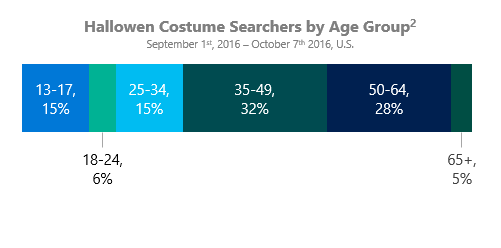
32% of the searches were made from people aged 35-49 and 28% of them were made from people aged 50-64. This is probably the reason why 72% of the searches occurred on PCs, with just 14% of them taking place on both tablet and mobile devices.
Halloween costume trends by age
Different age groups lead to different costume searches and apparently every generation has its own preferences:
Teens aged 13 to 17 are 473% more likely to search for Pokémon, compared to young adults aged 18 to 24.
Young adults aged 18 to 24 are 8% more likely to search for Little Mermaid than Deadpool.
Adults aged 25 to 34 are 10% more likely to search for Deadpool than Little Mermaid.
Adults aged 35 to 49 are 242% more likely to search for Harry Potter, at least compared to 25-34-year-olds.
Baby Boomers and Gen Xers aged 50 to 64 are 8% more likely to search for Alice in Wonderland than Pokémon.
Older Baby Boomers aged over 65 are both likely to search for Five Nights at Freddy's and Deadpool.
Most popular superhero searches
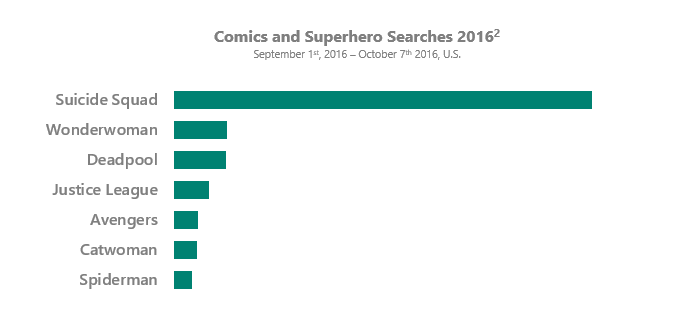
There's no surprise that the most popular search among comics and superheroes was “Suicide Squad” as its popularity (and the variety of costumes) reached a wide audience.
Most popular movie and TV costume searches
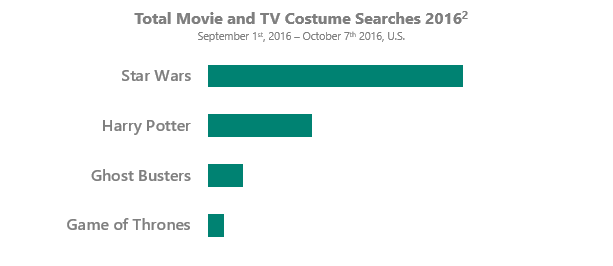
Star Wars is still the most popular choice in Halloween costumes, leaving behind Harry Potter and Ghostbusters, with Game of Thrones lacking the buzz it had the previous years.
Most popular Disney costume searches
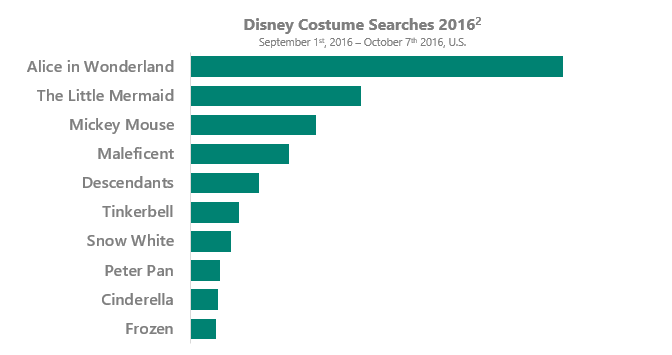
Disney costumes are more about classic choices, for anyone feeling nostalgic enough to pick Alice in Wonderland, Little Mermaid, or Mickey Mouse.
Did any of these help you find your Halloween costume?
Web technologies and their adoption are advancing at a frenetic pace. Content is a game that every type of team and agency plays, so we're all competing for a piece of that pie. Meanwhile, technical SEO is more complicated and more important than ever before and much of the SEO discussion has shied away from its growing technical components in favor of content marketing.
As a result, SEO is going through a renaissance wherein the technical components are coming back to the forefront and we need to be prepared. At the same time, a number of thought leaders have made statements that modern SEO is not technical. These statements misrepresent the opportunities and problems that have sprouted on the backs of newer technologies. They also contribute to an ever-growing technical knowledge gap within SEO as a marketing field and make it difficult for many SEOs to solve our new problems.
That resulting knowledge gap that's been growing for the past couple of years influenced me to, for the first time, “tour” a presentation. I'd been giving my Technical SEO Renaissance talk in one form or another since January because I thought it was important to stoke a conversation around the fact that things have shifted and many organizations and websites may be behind the curve if they don't account for these shifts. A number of things have happened that prove I've been on the right track since I began giving this presentation, so I figured it's worth bringing the discussion to continue the discussion. Shall we?
An abridged history of SEO (according to me)
It's interesting to think that the technical SEO has become a dying breed in recent years. There was a time when it was a prerequisite.
Personally, I started working on the web in 1995 as a high school intern at Microsoft. My title, like everyone else who worked on the web then, was "webmaster." This was well before the web profession splintered into myriad disciplines. There was no Front End vs. Backend. There was no DevOps or UX person. You were just a Webmaster.
Back then, before Yahoo, AltaVista, Lycos, Excite, and WebCrawler entered their heyday, we discovered the web by clicking linkrolls, using Gopher, Usenet, IRC, from magazines, and via email. Around the same time, IE and Netscape were engaged in the Browser Wars and you had more than one client-side scripting language to choose from. Frames were the rage.
Then the search engines showed up. Truthfully, at this time, I didn't really think about how search engines worked. I just knew Lycos gave me what I believed to be the most trustworthy results to my queries. At that point, I had no idea that there was this underworld of people manipulating these portals into doing their bidding.
SEO was born of a cross-section of these webmasters, the subset of computer scientists that understood the otherwise esoteric field of information retrieval and those “Get Rich Quick on the Internet” folks. These Internet puppeteers were essentially magicians who traded tips and tricks in the almost dark corners of the web. They were basically nerds wringing dollars out of search engines through keyword stuffing, content spinning, and cloaking.
Early Google updates started the cat-and-mouse game that would shorten some perpetual vacations. To condense the last 15 years of search engine history into a short paragraph, Google changed the game from being about content pollution and link manipulation through a series of updates starting with Florida and more recently Panda and Penguin. After subsequent refinements of Panda and Penguin, the face of the SEO industry changed pretty dramatically. Many of the most arrogant “I can rank anything” SEOs turned white hat, started software companies, or cut their losses and did something else. That's not to say that hacks and spam links don't still work, because they certainly often do. Rather, Google's sophistication finally discouraged a lot of people who no longer have the stomach for the roller coaster.
Simultaneously, people started to come into SEO from different disciplines. Well, people always came into SEO from very different professional histories, but it started to attract a lot more more actual “marketing” people. This makes a lot of sense because SEO as an industry has shifted heavily into a content marketing focus. After all, we've got to get those links somehow, right?
Naturally, this begat a lot of marketers marketing to marketers about marketing who made statements like “Modern SEO Requires Almost No Technical Expertise.”
Or one of my favorites, that may have attracted even more ire: “SEO is Makeup.”
While I, naturally, disagree with these statements, I understand why these folks would contribute these ideas in their thought leadership. Irrespective of the fact that I've worked with both gentlemen in the past in some capacity and know their predispositions towards content, the core point they're making is that many modern Content Management Systems do account for many of our time-honored SEO best practices. Google is pretty good at understanding what you're talking about in your content. Ultimately, your organization's focus needs to be on making something meaningful for your user base so you can deliver competitive marketing.
Changes in web technology are causing a technical renaissance
In SEO, we often criticize developers for always wanting to deploy the new shiny thing. Moving forward, it's important that we understand the new shiny things so we can be more effective in optimizing them.
When we'd initially examined the idea of headless browsing in 2011, the collective response was that the computational expense prohibited it at scale. But it seems that even if that is the case, Google believes enough of the web is rendered using JavaScript that it's a worthy investment.
Over time more and more folks would examine this idea; ultimately, a comment from this ex-Googler on Hacker News would indicate that this has long been something Google understood needed conquering:
This was actually my primary role at Google from 2006 to 2010.
One of my first test cases was a certain date range of the Wall Street Journal's archives of their Chinese language pages, where all of the actual text was in a JavaScript string literal, and before my changes, Google thought all of these pages had identical content... just the navigation boilerplate. Since the WSJ didn't do this for its English language pages, my best guess is that they weren't trying to hide content from search engines, but rather trying to work around some old browser bug that incorrectly rendered (or made ugly) Chinese text, but somehow rendering text via JavaScript avoided the bug.
The really interesting parts were (1) trying to make sure that rendering was deterministic (so that identical pages always looked identical to Google for duplicate elimination purposes) (2) detecting when we deviated significantly from real browser behavior (so we didn't generate too many nonsense URLs for the crawler or too many bogus redirects), and (3) making the emulated browser look a bit like IE and Firefox (and later Chrome) at the some time, so we didn't get tons of pages that said "come back using IE" er "please download Firefox".
I ended up modifying SpiderMonkey's bytecode dispatch to help detect when the simulated browser had gone off into the weeds and was likely generating nonsense.
I went through a lot of trouble figuring out the order that different JavaScript events were fired off in IE, FireFox, and Chrome. It turns out that some pages actually fire off events in different orders between a freshly loaded page and a page if you hit the refresh button. (This is when I learned about holding down shift while hitting the browser's reload button to make it act like it was a fresh page fetch.)
At some point, some SEO figured out that random() was always returning 0.5. I'm not sure if anyone figured out that JavaScript always saw the date as sometime in the Summer of 2006, but I presume that has changed. I hope they now set the random seed and the date using a keyed cryptographic hash of all of the loaded javascript and page text, so it's deterministic but very difficult to game. (You can make the date determistic for a month and dates of different pages jump forward at different times by adding an HMAC of page content (mod number of seconds in a month) to the current time, rounding down that time to a month boundary, and then subtracting back the value you added earlier. This prevents excessive index churn from switching all dates at once, and yet gives each page a unique date.)
Now, consider these JavaScript usage statistics across the web from BuiltWith:
JavaScript is obviously here to stay. Most of the web is using it to render content in some form or another. This means there's potential for search quality to plummet over time if Google couldn't make sense of what content is on pages rendered with JavaScript.
Additionally, Google's own JavaScript MVW framework, AngularJS, has seen pretty strong adoption as of late. When I attended Google's I/O conference a few months ago, the recent advancements of Progressive Web Apps and Firebase were being harped upon due to the speed and flexibility they bring to the web. You can only expect that developers will make a stronger push.
Sadly, despite BuiltVisible's fantastic contributions to the subject, there hasn't been enough discussion around Progressive Web Apps, Single-Page Applications, and JavaScript frameworks in the SEO space. Instead, there are arguments about 301s vs 302s. Perhaps the latest spike in adoption and the proliferation of PWAs, SPAs, and JS frameworks across different verticals will change that. At iPullRank, we've worked with a number of companies who have made the switch to Angular; there's a lot worth discussing on this specific topic.
Additionally, Facebook's contribution to the JavaScript MVW frameworks, React, is being adopted for the very similar speed and benefits of flexibility in the development process.
However, regarding SEO, the key difference between Angular and React is that, from the beginning, React had a renderToString function built in which allows the content to render properly from the server side. This makes the question of indexation of React pages rather trivial.
AngularJS 1.x, on the other hand, has birthed an SEO best practice wherein you pre-render pages using headless browser-driven snapshot appliance such as Prerender.io, Brombone, etc. This is somewhat ironic, as it's Google's own product. More on that later.
View Source is dead
As a result of the adoption of these JavaScript frameworks, using View Source to examine the code of a website is an obsolete practice. What you're seeing in View Source is not the computed Document Object Model (DOM). Rather, you're seeing the code before it's processed by the browser. The lack of understanding around why you might need to view a page's code differently is another instance where having a more detailed understanding of the technical components of how the web works is more effective.
Depending on how the page is coded, you may see variables in the place of actual content, or you may not see the completed DOM tree that's there once the page has loaded completely. This is the fundamental reason why, as soon as an SEO hears that there's JavaScript on the page, the recommendation is to make sure all content is visible without JavaScript.
To illustrate the point further, consider this View Source view of Seamless.com. If you look for the meta description or the rel-canonical on this page, you'll find variables in the place of the actual copy:
If instead you look at the code in the Elements section of Chrome DevTools or Inspect Element in other browsers, you'll find the fully executed DOM. You'll see the variables are now filled in with copy. The URL for the rel-canonical is on the page, as is the meta description:
Since search engines are crawling this way, you may be missing out on the complete story of what's going on if you default to just using View Source to examine the code of the site.
HTTP/2 is on the way
One of Google's largest points of emphasis is page speed. An understanding of how networking impacts page speed is definitely a must-have to be an effective SEO.
Before HTTP/2 was announced, the HyperText Transfer Protocol specification had not been updated in a very long time. In fact, we've been using HTTP/1.1 since 1999. HTTP/2 is a large departure from HTTP/1.1, and I encourage you to read up on it, as it will make a dramatic contribution to the speed of the web.
Quickly though, one of the biggest differences is that HTTP/2 will make use of one TCP (Transmission Control Protocol) connection per origin and “multiplex” the stream. If you've ever taken a look at the issues that Google PageSpeed Insights highlights, you'll notice that one of the primary things that always comes up is limiting the number of HTTP requests/ This is what multiplexing helps eliminate; HTTP/2 opens up one connection to each server, pushing assets across it at the same time, often making determinations of required resources based on the initial resource. With browsers requiring Transport Layer Security (TLS) to leverage HTTP/2, it's very likely that Google will make some sort of push in the near future to get websites to adopt it. After all, speed and security have been common threads throughout everything in the past five years.
As of late, more hosting providers have been highlighting the fact that they are making HTTP/2 available, which is probably why there's been a significant jump in its usage this year. The beauty of HTTP/2 is that most browsers already support it and you don't have to do much to enable it unless your site is not secure.
Definitely keep HTTP/2 on your radar, as it may be the culmination of what Google has been pushing for.
SEO tools are lagging behind search engines
When I think critically about this, SEO tools have always lagged behind the capabilities of search engines. That's to be expected, though, because SEO tools are built by smaller teams and the most important things must be prioritized. A lack of technical understanding may lead to you believe the information from the tools you use when they are inaccurate.
When you review some of Google's own documentation, you'll find that some of my favorite tools are not in line with Google's specifications. For instance, Google allows you to specify hreflang, rel-canonical, and x-robots in HTTP headers. There's a huge lack of consistency in SEO tools' ability to check for those directives.
It's possible that you've performed an audit of a site and found it difficult to determine why a page has fallen out of the index. It very well could be because a developer was following Google's documentation and specifying a directive in an HTTP header, but your SEO tool did not surface it. In fact, it's generally better to set these at the HTTP header level than to add bytes to your download time by filling up every page's
with them.
Google is crawling headless, despite the computational expense, because they recognize that so much of the web is being transformed by JavaScript. Recently, Screaming Frog made the shift to render the entire page using JS:
To my knowledge, none of the other crawling tools are doing this yet. I do recognize the fact that it would be considerably more expensive for all SEO tools to make this shift because cloud server usage is time-based and it takes significantly more time to render a page in a browser than to just download the main HTML file. How much time?
A ton more time, actually. I just wrote a simple script that just loads the HTML using both cURL and HorsemanJS. cURL took an average of 5.25 milliseconds to download the HTML of the Yahoo homepage. HorsemanJS, on the other hand, took an average of 25,839.25 milliseconds or roughly 26 seconds to render the page. It's the difference between crawling 686,000 URLs an hour and 138.
Ideally, SEO tools would extract the technologies in use on the site or perform some sort of DIFF operation on a few pages and then offer the option to crawl headless if it's deemed worthwhile.
Finally, Google's specs on mobile also say that you can use client-side redirects. I'm not aware of a tool that tracks this. Now, I'm not saying leveraging JavaScript redirects for mobile is the way you should do it. Rather that Google allows it, so we should be able to inspect it easily.
Luckily, until SEO tools catch up, Chrome DevTools does handle a lot of these things. For instance, the HTTP Request and Response headers section will show you x-robots, hreflang, and rel-canonical HTTP headers.
You can also use DevTools' GeoLocation Emulator to get view the web as though you are in a different location. For those of you who have fond memories of the nearEquals query parameter, this is another way you can get a sense of where you rank in precise locations.
Chrome DevTools also allows you to plug in your Android device and control it from your browser. There's any number of use cases for this from an SEO perspective, but Simo Ahava wrote a great instructional post on how you can use it to debug your mobile analytics setup. You can do the same on iOS devices in Safari if you have a Mac.
What truly are rankings in 2016?
Rankings are a funny thing and, truthfully, have been for some time now. I, myself, was resistant to the idea of averaged rankings when Google rolled them out in Webmaster Tools/Search Console, but average rankings actually make a lot more sense than what we look at in standard ranking tools. Let me explain.
SEO tools pull rankings based on a situation that doesn't actually exist in the real world. The machines that scrape Google are meant to be clean and otherwise agnostic unless you explicitly specify a location. Effectively, these tools look to understand how rankings would look to users searching for the first time with no context or history with Google. Ranking software emulates a user who is logging onto the web for the first time ever and the first thing they think to do is search for “4ft fishing rod.” Then they continually search for a series of other related and/or unrelated queries without ever actually clicking on a result. Granted. some software may do other things to try and emulate that user, but either way they collect data that is not necessarily reflective of what real users see. And finally, with so many people tracking many of the same keywords so frequently, you have to wonder how much these tools inflate search volume.
The bottom line is that we are ignoring true user context, especially in the mobile arena.
Rankings tools that allow you to track mobile rankings usually let you define one context or they will simply specify “mobile phone” as an option. Cindy Krum's research indicates that SERP features and rankings will be different based on the combination of user agent, phone make and model, browser, and even the content on their phone.
Rankings tools also ignore the user's reality of choice. We're in an era where there are simply so many elements that comprise the SERP, that #1 is simply NOT #1. In some cases, #1 is the 8th choice on the page and far below the fold.
With AdWords having a 4th ad slot, organic being pushed far below the fold, and users not being sure of the difference between organic and paid, being #1 in organic doesn't mean what it used to. So when we look at rankings reports that tell us we're number one, we're often deluding ourselves as to what outcome that will drive. When we report that to clients, we're not focusing on actionability or user context. Rather, we are focusing entirely on vanity.
Of course, rankings are not a business goal; they're a measure of potential or opportunity. No matter how much we talk about how they shouldn't be the main KPI, rankings are still something that SEOs point at to show they're moving the needle. Therefore we should consider thinking of organic rankings as being relative to the SERP features that surround them.
In other words, I'd like to see rankings include both the standard organic 1–10 ranking as well as the absolute position with regard to Paid, local packs, and featured snippets. Anything else is ignoring the impact of the choices that are overwhelmingly available to the user.
Recently, we've seen some upgrades to this effect with Moz making a big change to how they are surfacing features of rankings and I know a number of other tools have highlighted the organic features as well. Who will be the first to highlight the Integrated Search context? After all, many users don't know the difference.
What is cloaking in 2016?
Cloaking is officially defined as showing search engines something different from the user. What does that mean when Google allows adaptive and responsive sites and crawls both headless and text-based? What does that mean when Googlebot respects 304 response codes?
Under adaptive and responsive models, it's often the case that more or less content is shown for different contexts. This is rare for responsive, as it's meant to reposition and size content by definition, but some implementations may instead reduce content components to make the viewing context work.
In the case when a site responds to screen resolution by changing what content is shown and more content is shown beyond the resolution that Googlebot renders, how do they distinguish that from cloaking?
Similarly, the 304 response code is way to indicate to the client that the content has not been modified since the last time it visited; therefore, there's no reason to download it again.
Googlebot adheres to this response code to keep from being a bandwidth hog. So what's to stop a webmaster from getting one version of the page indexed, changing it, and then returning a 304?
I don't know that there are definitive answers to those questions at this point. However, based on what I'm seeing in the wild, these have proven to be opportunities for technical SEOs that are still dedicated to testing and learning.
Crawling
Accessibility of content as a fundamental component that SEOs must examine has not changed. What has changed is the type of analytical effort that needs to go into it. It's been established that Google's crawling capabilities have improved dramatically and people like Eric Wu have done a great job of surfacing the granular detail of those capabilities with experiments like JSCrawlability.com
Similarly, I wanted to try an experiment to see how Googlebot behaves once it loads a page. Using LuckyOrange, I attempted to capture a video of Googlebot once it gets to the page:
I installed the LuckyOrange script on a page that hadn't been indexed yet and set it up so that it only only fires if the user agent contains “googlebot.” Once I was set up, I then invoked Fetch and Render from Search Console. I'd hoped to see mouse scrolling or an attempt at a form fill. Instead, the cursor never moved and Googlebot was only on the page for a few seconds. Later on, I saw another hit from Googlebot to that URL and then the page appeared in the index shortly thereafter. There was no record of the second visit in LuckyOrange.
While I'd like to do more extensive testing on a bigger site to validate this finding, my hypothesis from this anecdotal experience is that Googlebot will come to the site and make a determination of whether a page/site needs to be crawled using the headless crawler. Based on that, they'll come back to the site using the right crawler for the job.
I encourage you to give it a try as well. You don't have to use LuckyOrange - you could use HotJar or anything else like it - but here's my code for LuckyOrange:
jQuery(function() {

    Window.__lo_site_id = XXXX;

    if (navigator.userAgent.toLowerCase().indexOf('googlebot') >)

    {

        var wa = document.createElement('script');

        wa.type = 'text/javascript';

        wa.async = true;

        wa.src = ('https' == document.location.protocol ? 'https://ssl' : 'http://cdn') + '.luckyorange.com/w.js';

        var s = document.getElementByTagName('script')[0];

        s.parentNode.insertBefore(wa,s);

        // Tag it with Googlebot

        window._loq = window._low || [];

        window._loq .push([“tag”, “Googlebot”]);

    }

));
The moral of the story, however, is that what Google sees, how often they see it, and so on are still primary questions that we need to answer as SEOs. While it's not sexy, log file analysis is an absolutely necessary exercise, especially for large-site SEO projects - perhaps now more than ever, due to the complexities of sites. I'd encourage you to listen to everything Marshall Simmonds says in general, but especially on this subject.
To that end, Google's Crawl Stats in Search Console are utterly useless. These charts tell me what, exactly? Great, thanks Google, you crawled a bunch of pages at some point in February. Cool!
There are any number of log file analysis tools out there, from Kibana in the ELK stack to other tools such as Logz.io. However, the Screaming Frog team has made leaps and bounds in this arena with the recent release of their Log File Analyzer.
Of note with this tool is how easily it handles millions of records, which I hope is an indication of things to come with their Spider tool as well. Irrespective of who makes the tool, the insights that it helps you unlock are incredibly valuable in terms of what's actually happening.
We had a client last year that was adamant that their losses in organic were not the result of the Penguin update. They believed that it might be due to turning off other traditional and digital campaigns that may have contributed to search volume, or perhaps seasonality or some other factor. Pulling the log files, I was able to layer all of the data from when all of their campaigns were running and show that it was none of those things; rather, Googlebot activity dropped tremendously right after the Penguin update and at the same time as their organic search traffic. The log files made it definitively obvious.
It follows conventionally held SEO wisdom that Googlebot crawls based on the pages that have the highest quality and/or quantity of links pointing to them. In layering the the number of social shares, links, and Googlebot visits for our latest clients, we're finding that there's more correlation between social shares and crawl activity than links. In the data below, the section of the site with the most links actually gets crawled the least!
These are important insights that you may just be guessing at without taking the time to dig into your log files.
How log files help you understand AngularJS
Like any other web page or application, every request results in a record in the logs. But depending on how the server is setup, there are a ton of lessons that can come out of it with regard to AngularJS setups, especially if you're pre-rendering using one of the snapshot technologies.
For one of our clients, we found that oftentimes when the snapshot system needed to refresh its cache, it took too long and timed out. Googlebot understands these as 5XX errors.
This behavior leads to those pages falling out of the index, and over time we saw pages jump back and forth between ranking very highly and disappearing altogether, or another page on the site taking its place.
Additionally, we found that there were many instances wherein Googlebot was being misidentified as a human user. In turn, Googlebot was served the AngularJS live page rather than the HTML snapshot. However, despite the fact that Googlebot was not seeing the HTML snapshots for these pages, these pages were still making it into the index and ranking just fine. So we ended up working with the client on a test to remove the snapshot system on sections of the site, and organic search traffic actually improved.
This is directly in line with what Google is saying in their deprecation announcement of the AJAX Crawling scheme. They are able to access content that is rendered using JavaScript and will index anything that is shown at load.
That's not to say that HTML snapshot systems are not worth using. The Googlebot behavior for pre-rendered pages is that they tend to be crawled more quickly and more frequently. My best guess is that this is due to the crawl being less computationally expensive for them to execute. All in all, I'd say using HTML snapshots is still the best practice, but definitely not the only way for Google see these types of sites.
According to Google, you shouldn't serve snapshots just for them, but for the speed enhancements that the user gets as well.
In general, websites shouldn't pre-render pages only for Google - we expect that you might pre-render pages for performance benefits for users and that you would follow progressive enhancement guidelines. If you pre-render pages, make sure that the content served to Googlebot matches the user's experience, both how it looks and how it interacts. Serving Googlebot different content than a normal user would see is considered cloaking, and would be against our Webmaster Guidelines.
These are highly technical decisions that have a direct influence on organic search visibility. From my experience in interviewing SEOs to join our team at iPullRank over the last year, very few of them understand these concepts or are capable of diagnosing issues with HTML snapshots. These issues are now commonplace and will only continue to grow as these technologies continue to be adopted.
However, if we're to serve snapshots to the user too, it begs the question: Why would we use the framework in the first place? Naturally, tech stack decisions are ones that are beyond the scope of just SEO, but you might consider a framework that doesn't require such an appliance, like MeteorJS.
Alternatively, if you definitely want to stick with Angular, consider Angular 2, which supports the new Angular Universal. Angular Universal serves “isomorphic” JavaScript, which is another way to say that it pre-renders its content on the server side.
Angular 2 has a whole host of improvements over Angular 1.x, but I'll let these Googlers tell you about them.
Before all of the crazy frameworks reared their confusing heads, Google has had one line of thought about emerging technologies - and that is “progressive enhancement.” With many new IoT devices on the horizon, we should be building websites to serve content for the lowest common denominator of functionality and save the bells and whistles for the devices that can render them.
If you're starting from scratch, a good approach is to build your site's structure and navigation using only HTML. Then, once you have the site's pages, links, and content in place, you can spice up the appearance and interface with AJAX. Googlebot will be happy looking at the HTML, while users with modern browsers can enjoy your AJAX bonuses.
In other words, make sure your content is accessible to everyone. Shoutout to Fili Weise for reminding me of that.
Scraping is the fundamental flawed core of SEO analysis
Scraping is fundamental to everything that our SEO tools do. cURL is a library for making and handling HTTP requests. Most popular programming languages have bindings for the library and, as such, most SEO tools leverage the library or something similar to download web pages.
Think of cURL as working similar to downloading a single file from an FTP; in terms of web pages, it doesn't mean that the page can be viewed in its entirety, because you're not downloading all of the required files.
This is a fundamental flaw of most SEO software for the very same reason View Source is not a valuable way to view a page's code anymore. Because there are a number of JavaScript and/or CSS transformations that happen at load, and Google is crawling with headless browsers, you need to look at the Inspect (element) view of the code to get a sense of what Google can actually see.
This is where headless browsing comes into play.
One of the more popular headless browsing libraries is PhantomJS. Many tools outside of the SEO world are written using this library for browser automation. Netflix even has one for scraping and taking screenshots called Sketchy. PhantomJS is built from a rendering engine called QtWebkit, which is to say it's forked from the same code that Safari (and Chrome before Google forked it into Blink) is based on. While PhantomJS is missing the features of the latest browsers, it has enough features to support most things we need for SEO analysis.
As you can see from the GitHub repository, HTML snapshot software such as Prerender.io is written using this library as well.
PhantomJS has a series of wrapper libraries that make it quite easy to use in a variety of different languages. For those of you interested in using it with NodeJS, check out HorsemanJS.
For those of you that are more familiar with PHP, check out PHP PhantomJS.
A more recent and better qualified addition to the headless browser party is Headless Chromium. As you might have guessed, this is a headless version of the Chrome browser. If I were a betting man, I'd say what we're looking at here is a some sort of toned-down fork of Googlebot.
To that end, this is probably something that SEO companies should consider when rethinking their own crawling infrastructure in the future, if only for a premium tier of users. If you want to know more about Headless Chrome, check out what Sami Kyostila and Alex Clarke (both Googlers) had to say at BlinkOn 6:
Using in-browser scraping to do what your tools can't
Although many SEO tools cannot examine the fully rendered DOM, that doesn't mean that you, as an an individual SEO, have to miss out. Even without leveraging a headless browser, Chrome can be turned into a scraping machine with just a little bit of JavaScript. I've talked about this at length in my “How to Scrape Every Single Page on the Web” post. Using a little bit of jQuery, you can effectively select and print anything from a page to the JavaScript Console and then export it to a file in whatever structure you prefer.
Scraping this way allows you to skip a lot of the coding that's required to make sites believe you're a real user, like authentication and cookie management that has to happen on the server side. Of course, this way of scraping is good for one-offs rather than building software around.
ArtooJS is a bookmarklet made to support in-browser scraping and automating scraping across a series of pages and saving the results to a file as JSON.
A more fully featured solution for this is the Chrome Extension, WebScraper.io. It requires no code and makes the whole process point-and-click.
How to approach content and linking from the technical context
Much of what SEO has been doing for the past few years has devolved into the creation of more content for more links. I don't know that adding anything to the discussion around how to scale content or build more links is of value at this point, but I suspect there are some opportunities for existing links and content that are not top-of-mind for many people.
Google Looks at Entities First
Googlers announced recently that they look at entities first when reviewing a query. An entity is Google's representation of proper nouns in their system to distinguish persons, places, and things, and inform their understanding of natural language. At this point in the talk, I ask people to put their hands up if they have an entity strategy. I've given the talk a dozen times at this point and there have only been two people to raise their hands.
Bill Slawski is the foremost thought leader on this topic, so I'm going to defer to his wisdom and encourage you to read:
I would also encourage you to use a natural language processing tool like AlchemyAPI or MonkeyLearn. Better still, use Google's own Natural Language Processing API to extract entities. The difference between your standard keyword research and entity strategies is that your entity strategy needs to be built from your existing content. So in identifying entities, you'll want to do your keyword research first and then run those landing pages through an entity extraction tool to see how they line up. You'll also want to run your competitor landing pages through those same entity extraction APIs to identify what entities are being targeted for those keywords.
TF*IDF
Similarly, Term Frequency/Inverse Document Frequency or TF*IDF is a natural language processing technique that doesn't get much discussion on this side of the pond. In fact, topic modeling algorithms have been the subject of much-heated debates in the SEO community in the past. The issue of concern is that topic modeling tools have the tendency to push us back towards the Dark Ages of keyword density, rather than considering the idea of creating content that has utility for users. However, in many European countries they swear by TF*IDF (or WDF*IDF - Within Document Frequency/Inverse Document Frequency) as a key technique that drives up organic visibility even without links.
After hanging out in Germany a bit last year, some folks were able to convince me that taking another look at TF*IDF was worth it. So, we did and then we started working it into our content optimization process.
In Searchmetrics' 2014 study of ranking factors they found that while TF*IDF specifically actually had a negative correlation with visibility, relevant and proof terms have strong positive correlations.
Based on their examination of these factors, Searchmetrics made the call to drop TF*IDF from their analysis altogether in 2015 in favor of the proof terms and relevant terms. Year over year the positive correlation holds for those types of terms, albeit not as high.
In Moz's own 2015 ranking factors, we find that LDA and TF*IDF related items remain in the highest on-page content factors.
In effect, no matter what model you look at, the general idea is to use related keywords in your copy in order to rank better for your primary target keyword, because it works.
Now, I can't say we've examined the tactic in isolation, but I can say that the pages that we've optimized using TF*IDF have seen bigger jumps in rankings than those without it. While we leverage OnPage.org's TF*IDF tool, we don't follow it using hard and fast numerical rules. Instead, we allow the related keywords to influence ideation and then use them as they make sense.
At the very least, this order of technical optimization of content needs to revisited. While you're at it, you should consider the other tactics that Cyrus Shepard called out as well in order to get more mileage out of your content marketing efforts.
302s vs 301s - seriously?
As of late, a reexamination of the 301 vs. 302 redirect has come back up in the SEO echo chamber. I get the sense that Webmaster Trends Analysts in the public eye either like attention or are just bored, so they'll issue vague tweets just to see what happens.
For those of you who prefer to do work rather than wait for Gary Illyes to tweet, all I've got is some data to share.
Once upon a time, we worked with a large media organization. As is par for the course with these types of organizations, their tech team was resistant to implementing much of our recommendations. Yet they had millions of links both internally and externally pointing to URLs that returned 302 response codes.
After many meetings, and a more compelling business case, the one substantial thing that we were able to convince them to do was switch those 302s into 301s. Nearly overnight there was an increase in rankings in the 1–3 rank zone.
Despite seasonality, there was a jump in organic Search traffic as well.
To reiterate, the only substantial change at this point was the 302 to 301 switch. It resulted in a few million more organic search visits month over month. Granted, this was a year ago, but until someone can show me the same happening or no traffic loss when you switch from 301s to 302s, there's no discussion for us to have.
Internal linking, the technical approach
Under the PageRank model, it's an axiom that the flow of link equity through the site is an incredibly important component to examine. Unfortunately, so much of the discussion with clients is only on the external links and not about how to better maximize the link equity that a site already has.
There are a number of tools out there that bring this concept to the forefront. For instance, Searchmetrics calculates and visualizes the flow of link equity throughout the site. This gives you a sense of where you can build internal links to make other pages stronger.
Either of these approaches is incredibly valuable to offering more visibility to content and very much fall in the bucket of what technical SEO can offer.
Structured data is the future of organic search
The popular one-liner is that Google is looking to become the presentation layer of the web. I say, help them do it!
There has been much discussion about how Google is taking our content and attempting to cut our own websites out of the picture. With the traffic boon that the industry has seen from sites making it into the featured snippet, it's pretty obvious that, in many cases, there's more value for you in Google taking your content than in them not.
With Vocal Search appliances on mobile devices and the forthcoming Google Home, there's only one answer that the user receives. That is to say that the Star Trek computer Google is building is not going to read every result - just one. These answers are fueled by rich cards and featured snippets, which are in turn fueled by structured data.
Google has actually done us a huge favor regarding structured data in updating the specifications that allow JSON-LD. Before this, Schema.org was a matter of making very tedious and specific changes to code with little ROI. Now structured data powers a number of components of the SERP and can simply be placed at the
Google has very aggressive expectations around page speed, especially for the mobile context. They want the above-the-fold content to load within one second. However, 800 milliseconds of that time is pretty much out of your control.
Based on what you can directly affect, as an SEO, you have 200 milliseconds to make content appear on the screen. A lot of what can be done on-page to influence the speed at which things load is optimizing the page for critical rendering path.
To understand this concept, first we have to take a bit of a step back to get a sense of how browsers construct a web page.
The browser takes the uniform resource locator (URL) that you specify in your address bar and performs a DNS lookup on the domain name.
Once a socket is open and a connection is negotiated, it then asks the server for the HTML of the page you've requested.
The browser begins to parse the HTML into the Document Object Model until it encounters CSS, then it starts to parse the CSS into the CSS Object Model.
If at any point it runs into JavaScript, it will pause the DOM and/or CSSOM construction until the JavaScript completes execution, unless it is asynchronous.
Once all of this is complete, the browser constructs the Render Tree, which then builds the layout of the page and finally the elements of the page are painted.
In the Timeline section of Chrome DevTools, you can see the individual operations as they happen and how they contribute to load time. In the timeline at the top, you'll always see the visualization as mostly yellow because JavaScript execution takes the most time out of any part of page construction. JavaScript causes page construction to halt until the the script execution is complete. This is called “render-blocking” JavaScript.
That term may sound familiar to you because you've poked around in PageSpeed Insights looking for answers on how to make improvements and “Eliminate Render-blocking JavaScript” is a common one. The tool is primarily built to support optimization for the Critical Rendering Path. A lot of the recommendations involve issues like sizing resources statically, using asynchronous scripts, and specifying image dimensions.
Additionally, external resources contribute significantly to page load time. For instance, I always see Chartbeat's library taking 3 or more seconds just to resolve the DNS. These are all things that need to be reviewed when considering how to make a page load faster.
If you know much about the Accelerated Mobile Pages (AMP) specification, a lot of what I just highlighted might sound very familiar to you.
Essentially, AMP exists because Google believes the general public is bad at coding. So they made a subset of HTML and threw a global CDN behind it to make your pages hit the 1 second mark. Personally, I have a strong aversion to AMP, but as many of us predicted at the top of the year, Google has rolled AMP out beyond just the media vertical and into all types of pages in the SERP. The roadmap indicates that there is a lot more coming, so it's definitely something we should dig into and look to capitalize on.
Using pre-browsing directives to speed things up
To support site speed improvements, most browsers have pre-browsing resource hints. These hints allow you to indicate to the browser that a file will be needed later in the page, so while the components of the browser are idle, it can download or connect to those resources now. Chrome specifically looks to do these things automatically when it can, and may ignore your specification altogether. However, these directives operate much like the rel-canonical tag - you're more likely to get value out of them than not.