Monday, September 26, 2016

Seven ways to future-proof your digital strategy

Nurcin Erdogan Loeffler, head of strategy and innovation, Vizeum China, outlines the seven ways businesses can future proof their digital strategies.


With more than two years in China and a background in strategy, Nurcin Erdogan Loeffler shared her thoughts on future proofing a business strategy with the audience at ClickZ Live Shanghai.


While the future for many of us is seen as something unpredictable and scary, the definition on Wikipedia is quite simple: “The Future” is the time after the present.


But what does that actually mean?


“When we look at the reality, especially in our industry, the future is now. We are already used to seeing science fiction as science fact,” says Erdogan Loeffler.


To understand the three stages of time, Erdogan Loeffler quoted from Steve Case's book: The Third Wave: An Entrepreneur's Vision of the Future.


The first wave: The first wave is the past. This was a period of infrastructure building to bring the technology to the people. Think Microsoft and Cisco.


The second wave: The second wave is the present. This is about the software. “It's about all those smart kids in their parents garages with a good idea that changed the world. It was about being agile, disruptive and empowering,” says Erdogan Loeffler.


The third wave: The third wave is the future which is already here. This will not be disruptive but constructive, says Erdogan Loeffler. “It will be different in terms of changing the world in terms of partnering up and growing further with existing partners.”


The futurist Gerd Leonhard, sums up how “change” itself will be disrupted in the future in this short video.


Digital transformation: are you ready for exponential change? Futurist Gerd Leonhard, TFAStudios


Here are Erdogan Loeffler's seven tips for future proofing your business strategy.


1. Don't have a digital strategy


It is very important at this moment in time where we are speaking about where we are in the future, that having a digital strategy doesn't make sense, says Erdogan Loeffler.


Having a business strategy that is built for the digital world on the other hand, is the future.


At the World Economic Forum in 2015, Eric Schmidt, executive chairman of Google (now Alphabet), caused a stir when he said the Internet would disappear.


“What he really meant is the Internet will become like air. The Internet will become everywhere. Today, when we talk about digital, we see it as medium, as a part of our marketing mix. But tomorrow, CEOs will become the head of digital… or vice versa,” says Erdogan Loeffler.


Once we start to accept that digital will be everywhere we will start to understand why it is not relevant to have a digital strategy.


“Having a digital strategy will be as absurd as having an electricity-enabled fridge. The Internet of things is almost over. The Internet of everywhere will become a reality very soon,” she adds.


2. People and their needs FIRST


Another of Erdogan Loeffler's favorite writers is James Harris and his book, Think More Analogue, Be More Digital. In it, Harris underlines five global human needs that drive all digital behavior.


These are:


  • Distraction

  • Learning

  • Recognition

  • Relationships

  • Progression


To confirm whether China fits into this global stereotype, Vizeum looked at annual Chinese consumer research involving the surveying of 70,000 people across the country. And the China results are not so dissimilar to global digital behavior.


The top three reasons for spending time online for Chinese consumers are:


  • They want to be kept updated with trends (64.4%)

  • It's a good source of learning (61%)

  • It puts me in a good mood (60%)


nurcin-erdogan-loeffler_chinese-consumer-digital-habbits_600


*Source: Vizeum / CCS 2015


The big difference however is that the sophisticated Chinese consumer has one key motivation – to stand out.


  • Almost 50% of Chinese adults what to stand out as an individual.

  • Almost 50% like to buy products that stand out as being different.

  • 80% of millennials believe that to be successful it is worth expressing my true opinion in front of others.


nurcin-erdogan-loeffler_standing-out_600


“What is important for future proofing your business strategy, is that behind every device is a human. They don't really remember what you are saying or what you are doing. They only remember how you make them feel. So emotional connections will always mean a better return on investment,” says Erdogan Loeffler.


3. Turn data into actionable insights


Data is like a jungle – it's dangerous and it's so big you can get lost in it, says Erdogan Loeffler.


“And unless you know your route and which animal you want to hunt, you have to be very careful or data can hunt you.”


Data is only meaningful when it can really be used and leveraged as an actionable human insight, she says.


Here's a case study of how Vizeum worked with Marina Bay Sands to close the loop within the digital network.


Marina Bay Sands / Vizeum APAC


4. Content is the king


In 1996, Bill Gates first used the slogan, “Content is King” and it's a strategy still being used today – 20 years on.


Erdogan Loeffler says the global rule for creating content that works is content that:


  • Lets you love

  • Makes you cry

  • Stimulates some desire


nurcin-erdogan-loeffler_content-is-king_600


*Source: Vizeum


Here's how SK-II's emotional “left over women” campaign brought many viewers in China to tears.


Good content, inspired by good insight always works, she says.


5. Context is the queen


Every king needs a queen.


“It's not enough to have great content – it needs to deliver the right message to the right person, in the right medium at the right place and the right time – and this is what we call context marketing,” says Erdogan Loeffler.


With the average attention span of a person now at about three seconds, advertisers have a small window to 'catch' the consumer. Therefore, it's very important to have the right content mixed and married with the right context, she says.


Here's how Vizeum worked with BBC Earth to launch in Asia, using behavioral and contextual data.


BBC Earth / Vizeum APAC


6. Watch your body language


A large part of human interaction is non-verbal – 60%. And it's no different for brand marketing, says Erdogan Loeffler.


“As brands we are saying we are amazing but behind that are you lying? Through social media the consumer can really understand a brand's body language.”


She cites KLM's brilliant use of 'body language' through its digital customer service channels.


“KLM is openly talking. It creates a profile beyond the brand, being helpful, being reactive. Ask them a question and within one hour they will reply.”


(Read a case study on KLM's use of WeChat for customer service in China here.)


7. Close the loop (or somebody else will close it for you)


In China, ecommerce, social commerce, m-commerce and brand commerce are well established.


Path to purchase used to be quite simple whereas now it's quite complicated, says Erdogan Loeffler. Gone are the days of a direct route, today's marketer never knows when the transaction will happen so it's important that every interaction has the potential to close the loop.


nurcin-erdogan-loeffler_the-path-to-purchase-is-no-longer-linear_600


Concluding her presentation, Erdogan Loeffler left the audience with one final piece of advice.


“I believe all of theses points are very important but one key takeaway is to remember that people are not cookies or devices or audiences or consumers. People are people.”

Friday, September 23, 2016

Penguin 4.0: Was It Worth the Wait?

Posted by Dr-Pete

For almost two years (707 days, to be precise), one question has dominated the SEO conversation: “When will Google update Penguin?” Today, we finally have the answer. Google announced that a Penguin update is rolling out and that Penguin is now operating in real-time.

September has been a very volatile month for the SERPs (more on that later in the post), but here's what we're seeing in MozCast for the past two weeks, including last night:


In a normal month, a temperature of 82°F would be slightly interesting, but it's hardly what many people were expecting, and September 2016 has been anything but a normal month. It takes time to refresh the entire index, though, so it's likely Penguin volatility will continue for a few days. I'll update this graph over the next few days if anything more interesting happens.

What happened in September?

September has been the most volatile month for SERPs since I started tracking temperatures in April of 2012 (just a couple of weeks before Penguin 1.0). To the best of my knowledge at this time, the volatility during the rest of September was not due to the Penguin 4.0 roll-out.

There are no official statements (currently) about other updates, but we're aware of two things. First, many local SEOs saw major shifts around September 1st, when MozCast tracked a high of 108°F. This has been dubbed the Possum Update, and reports are that local pack URLs also moved substantially (MozCast does not track this data). We did see an overall drop in local pack presence in our data set on that day (about 7.3% day-over-day).

Second, between September 13th and 14th there was a massive drop in SERPs with image (vertical) results on page 1 in our data set. This caused substantial volatility, as image results occupy an organic position and so those SERPs got an extra organic result on page 1. The temperature that day was 111°F. Here's the two-week graph of SERPs with image results on page 1:


SERPs with images in our data set dropped 49% overnight and have not recovered. I've hand-checked dozens of these results and have verified the drop. In some cases, images moved to deeper pages. It's unclear if other vertical/universal results were affected.

Were you affected by Penguin 4.0?

I've often said that measuring algorithm flux is like tracking the unemployment rate. It's interesting to the economy at large if the rate is 5% or 6%, but ultimately you either have a job or you don't. If you were hit by an algorithm update, it's little comfort that the MozCast temperature was low on that day.

Hopefully, if you were impacted by Penguin in the past and have made changes, those changes have been rewarded (or soon will be). The good news is that, now that Penguin is real-time, we shouldn't have to wait another two years for a major refresh.


Sign up for The Moz Top 10, a semimonthly mailer updating you on the top ten hottest pieces of SEO news, tips, and rad links uncovered by the Moz team. Think of it as your exclusive digest of stuff you don't have time to hunt down but want to read!

Six most important search marketing news stories of the week

Welcome to our weekly round-up of all the latest news and research from around the world of search marketing and beyond.


This week we have Google unleashing Penguin 4.0, AMP coming to organic mobile SERPs, Twitter making some changes for the better and the introduction of Google's own personal messenger service, Allo.


Penguin 4.0 is finally rolled out


As I reported earlier today, Google has finally confirmed that its Penguin algorithm update is now rolling out in all languages.


penguins marching to war


The spammy-link killing update will feature the following improvements…


Penguin is now real-time


Penguin data is refreshed in real time, so any changes will be made as soon as the affected page has been recrawled and reindexed.


Previously affected webmasters would have to wait for the next update before any penalties could be cleared.


Penguin is now more granular


Penguin now devalues spam by adjusting ranking based on spam signals, rather than affecting ranking of the whole site.


This means the specific page will be penalised, rather than the entire website.


Google AMP is coming to organic search results by the end of the year – confirmed


Google's Rudy Galfi, Google's lead product manager for AMP, revealed this week that the global rollout of AMP in mobile organic search would be complete by the end of the year.


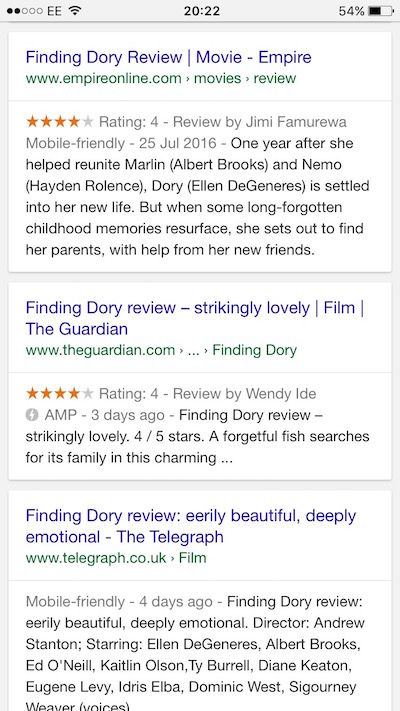
A screenshot of a mobile search results page for 'Finding Dory review', featuring an AMP result from The Guardian in the middle.


In further remarks posted on Search Engine Land, Galfi clarified that AMP still isn't a ranking signal. And although Galfi wouldn't share specific user-response data, he did state, “We're seeing great user response.” He also said that Google has been “humbled” by the industry's adoption of AMP.


The Coalition for Better Ads to make digital ads great again


As Al Roberts reported this week, a new organization called The Coalition for Better Ads, has been launched to “leverage consumer insights and cross-industry expertise to develop and implement new global standards for online advertising that address consumer expectations.”


This basically means that the coalition will identify new standards that can improve the digital ad experience, implement the technologies needed for these standards, and promote the standards so that they're put into use.


Worth switching your adblocker off for? We'll see.


Twitter makes a few changes – good ones too!


Although Twitter has threatened various unpopular changes over the last 12 months – introducing verification for non-celebrities (celebrities hate this, and by celebrities I mean, Pewdiepie), killing share counts, a 10,000 character increase – here's one that we've been crying out for…


Actually, why tell you via this article, when I can show in embedded tweet form.


Same goes for images too. Annoyingly links and @mentions still take up characters though.


Still, we got our sweet gifs though, huh gang?


Google launches its 'private' messenger service Allo


Because all the kids are leaving social in droves because they like private messenger apps and not being spied on, Google has realised it wants a piece of that action.


So say allo to Allo – another channel to be pinged on by one or two early adopters while desperately trying to keep up with your WhatsApps, Facebook Messages, texts, emails and all the notices on the office fridge to stop eating all the humous.


Yeah. Let's escape to the mountains together. Come on, I'll pack some sandwiches, you bring a torch.


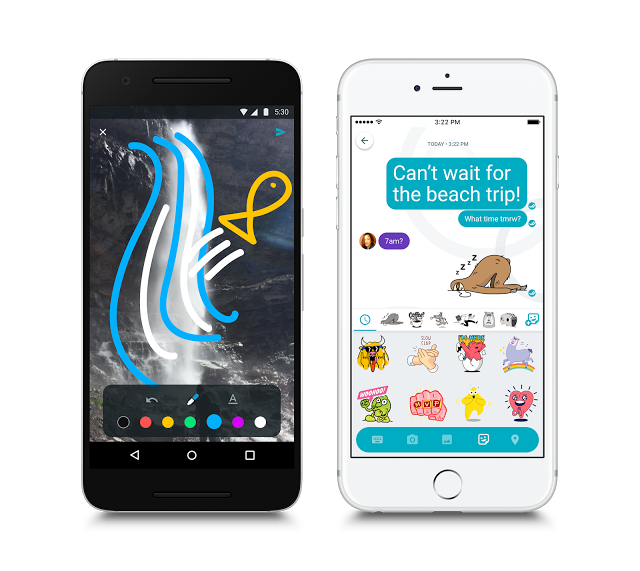
Here's what Allo will look like…


blog-image-screens-6


Cute, although a few sloth emojis won't persuade Edward Snowden to use it anytime soon.


Google will continue to display Quality Score data until October 10


As reported by Matt Southern on Search Engine Journal, Google claimed it would be returning null quality scores for new and underperforming keywords in AdWords as of September 12th.


However as Matt points out, if you've logged in to your AdWords account lately you may have noticed you still have quality score information for new and underperforming keywords.


This is because Google has pushed the date back to October 10th, in order to “give advertisers more time to review their reports, filters, rules, and scripts that rely on Quality Scores, null Quality Scores will now roll out the week of October 10th, 2016.”


Thursday, September 22, 2016

CTR as a ranking factor: what we know so far and how to action it

For the last two years there has been much discussion and debate around whether click through rate (CTR) is something Google uses to determine where to rank a site.


It all began way back when Rand Fishkin did an interesting experiment which provided some evidence behind his theory that CTR is in fact something that could influence rankings.


rand-tweet


This theory makes sense; why wouldn't Google be looking at user based signals to improve search results?


Just as we do user testing on our websites to increase the number of conversions, Google will surely want to be looking at user signals to ensure they are fulfilling their goal of 'organising the world's information' in the correct order in SERPs.


Why CTR is not a ranking factor, from Google


However, many times when Google, and more specifically Gary Illyses, has been questioned on this we have received the response of the opposite. That Google does not use CTR as a ranking factor due to it being a 'noisy signal' and something that could be gamed by spammers.


See this response from Gary Illyses in an interesting interview with Kwasi Studios:


ilyes-quote


We also received the same response from Gary when he mentioned the topic in June 2015 at SMX Advanced.


At the event Gary did, however, say CTR is being used for personalisation, meaning search results change if you frequently click on the same site. This can be especially useful for ambiguous terms.


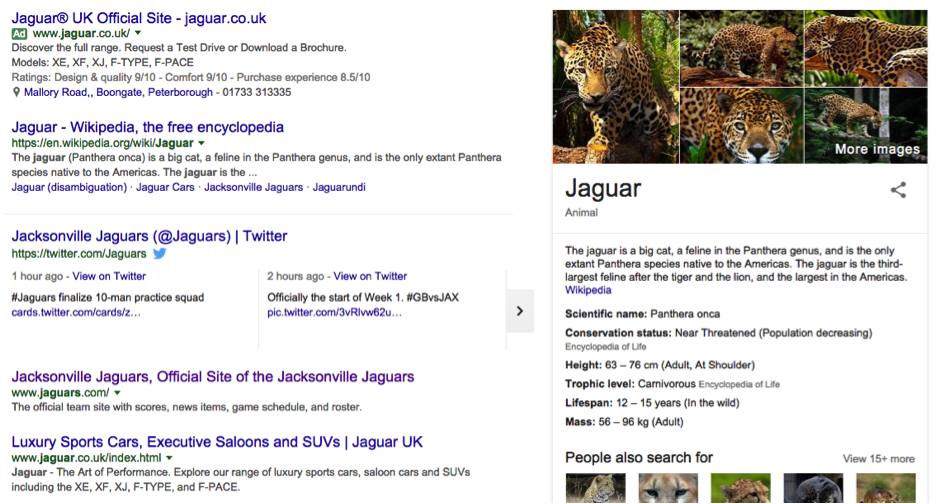
For example, if a user searched for 'Jaguars' a 'Query Deserves Diversity' (QDD) algorithm will take effect and display results for the car brand, the Jacksonville Jaguars as well as the animal.


jaguar-search-term


If the user then clicks on the car brand and does that frequently, Google will be more likely to show the Jaguar car brand due to the high CTR for the Jaguar site. Other than that, Gary says click data is not being used.


Why CTR is an indirect ranking factor, from Google


Due to this negative feedback received from Google around the topic, some have dismissed CTR as something that Google does not make use of.


However, conversely we have had other statements from Google that specify they do in fact use CTR in some circumstances.


The primary evidence we have from Google that CTR is being used for more than just personalisation is in this excellent presentation by Paul Haahr titled 'How Google Works: A Ranking Engineer's Perspective'.


If you have not watched the presentation yet, I highly recommend it! You can find a video of it here.


From this video, we can gather Google is using click through rate, but not to adjust rankings directly. They are instead using it indirectly in controlled situations to validate the quality of search results.


They are also using it to verify that an algorithm change has the desired results. 'Controlled situations' means they are taking a portion of search results, testing changes and using CTR as a metric to measure if the changes had the desired impact on improving user engagement.


Following what Google has said regarding CTR, this means that it is not being used in a way to directly change search results. It is instead being used to test whether changes to direct ranking signals such as content and links are improving user engagement and the quality of search results.


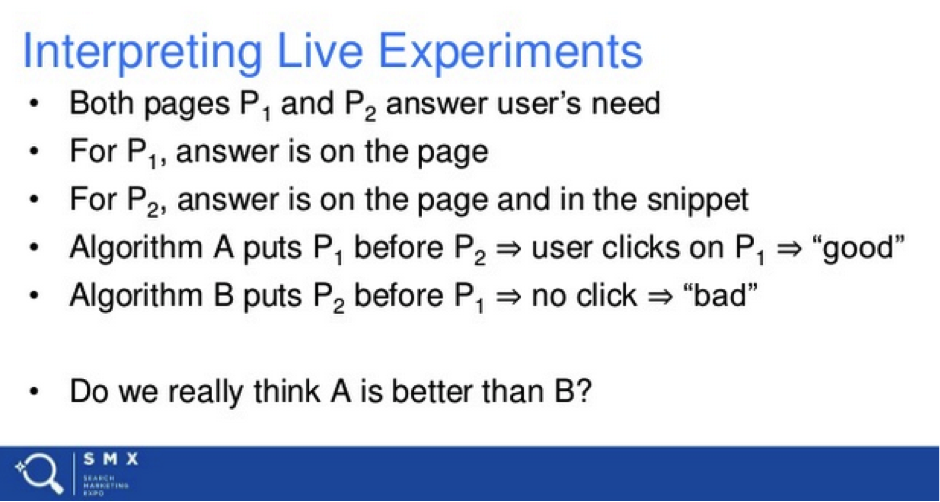
This is explained in this slide on Paul Haahr's presentation:


intepreting-live-experiments


Other ways Google is measuring the quality of search results


As explained in the presentation, CTR is only one of the ways Google is testing search results are showing up in the correct order.


They are also taking a more manual approach with human rater experiments. This is where Google will show an actual person a search result that has an experimental algorithm change on it, and they get them to score the page based on whether the needs have been met (does the page fulfil user intent), and the quality of the page.


scales-of-ranking


What this means is gaming the system explained here by artificially increasing CTR becomes virtually impossible, as along with live experiments, there is a manual review of pages before algorithm changes take place.


I am sure CTR and human rater experiments are only some of the ways Google will be testing algorithm changes.


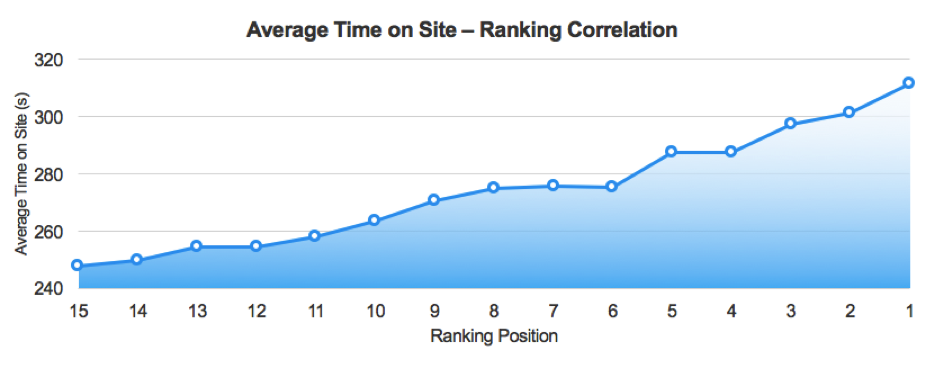
While this was never mentioned as a user engagement metric in the presentation, there is a high chance they are also paying attention to pogo sticking and dwell time. If this is true, it makes metrics such as average time on site and bounce rate important things to consider.


Here is a bit of data sourced from our in-house 'Roadmap' technology that looks at over 160 potential ranking factors and shows correlations in search performance.


And yes, I know correlation does not mean causation, but it can give us a good indication what Google is taking into consideration when ranking sites. Here is how average time on site correlates:


average-time-on-site


Source: Stickyeyes Roadmap


Of course, this does not mean Google is directly creating algorithms that change rankings based on things such as average time on site.


It does, however, inform us that Google is favouring sites that searchers stay on.


This metric could be used in a similar way to how Paul Haahr explains Google uses CTR, where they will adjust traditional signals such as content and links depending on whether the user stays on the site or not. Again, this is all speculation with a bit of data to back it up.


Why CTR Is a direct ranking factor (sometimes), from Rand


Despite what we know is 100% correct, as Google has confirmed it, we still have Rand Fishkin's CTR experiments that say Google is not telling us everything they use click data for.


This is where we have to speculate based on the information the SEO community has managed to get out of Google.


Thankfully some insight into this was given by Googler Andrey Lipattsev in a Q&A show back in March 2016 when Rand questioned him on it. Here is Andrey's response to Rand asking why exactly that happened:


“Andrey: It's hard to judge immediately, without actually looking at the data in front of me. But, in my opinion, my best guess here would be the general interest that you generate around that subject, and you generate exactly the sort of signals that we are looking out for, mentions and links and social tweets and social mentions, which are basically more links to the page, more mentions of this context. I suppose it throws us off for a while until we're able to establish that none of that is relevant to the user intent, I suppose.”


From Andrey's response, I believe he is explaining part of Google's algorithm that is a temporary ranking factor that identifies hot topics or searches and then adjusts rankings accordingly depending on social signals, and possibly user behaviour.


We already know Google tries to push rankings up for fresh content, and this algorithm seems similar to the freshness algorithm (announced way back in 2011).


When this ranking change occurs, it is more than likely that Google applies the technology they have to combat click fraud in Adwords. I believe this experiment that came to the result the CTR was not a ranking factor by using bot traffic backs this up.


What we know – summarised


From all of the above we can summarise what we know into the following things:


  1. Firstly, CTR does seem to have an immediate and temporary impact on rankings in some cases. This is more than likely due to an algorithm that aims to spot trending content and hot topics, and then adjusts rankings depending on which page is the most popular and seems to be fulfilling user intent. Again, this ranking change is temporary, and I imagine will be tough to try and game. It worked so well when Rand ran his experiment because he did it with actual people, not bots. In this instance, CTR is a temporary direct ranking factor.

  2. Secondly, Google is using CTR in live experiments to quality-check their results. This is not being done across all search results but in a controlled manner across a portion of different SERPs. Based upon the results, Google will then adjust other algorithms to do with links, content, etc. In this case, CTR is an indirect ranking factor.

  3. Thirdly, Google is using CTR to personalise results for individual users.


How to improve click-through rate


It is evident user engagement and sending users to the correct website is important to Google, because of this we also know optimising CTR is something we should be doing.


The rest of the post will be about how to identifying click through rate opportunities, and then how to improve it.


Finding low CTR terms


The only reliable data we have on CTR comes from Google itself in the Search Console search analytics report.


To help with identifying these terms I have made this CTR Opportunity Analysis template Google sheet. This sheet finds out what the average CTR is for keywords ranking position 1 – 100 from a GSC export, and then compares each keyword against your site's average CTR for that position.


This allows you to identify if there is a significant opportunity to improve click-through for a particular query. You can see whether there is an opportunity as it will tell you in the 'Optimise CTR' column.


If you rank higher than position ten it will simply say 'Improve Rankings'. If you have your own data on average CTR for it each position, there is a hidden sheet called 'CTR Ref' where you can fill this information in. You could also replace it with data from this Moz CTR study.


To find queries that that have a low click through rate do the following:


  1. Navigate to the search analytics report in GSC.

  2. Add the below filters (change country depending on your location, you may also want to add a device filter if desktop or mobile is your focus):


search-console-filter


  1. Download the results as a CSV (bottom left of the page). Then open up the CSV and format the position column so it has 0 decimal places (this will make more sense after the next step).

  2. Make a copy of this spreadsheet by going to File > Make A Copy.

  3. Paste the corresponding columns from the Google Search Console CSV into the template. At this point, you can scrape Google for each keywords position instead of relying on GSC's average position if you want to.


search-console-links


  1. Once you have this information set out like the above you can then filter the 'Optimise CTR' column to only show results that return a yes.

  2. Next, you can sort from high to low on impressions. The high-impression keywords that also return low scores on the 'CTR Difference from Average' are your top opportunities for optimising CTR.

  3. Copy one of these keywords, and head back to Google Search Console. In the queries filter add a filter for that keyword exactly.


filter-query


  1. After that select 'Pages' in the filter bar at the top to show pages ranking for that keyword.

  2. The page listed first should be the page you need to optimise.


Top ways to optimise for CTR


By now, we have the keywords and pages that we need to optimise for. We just need to go through the process of actually improving our pages. Here are some different things you can do to improve CTR:


  • Adjust title tags to contain the words or phrases you are getting a low CTR on. You can improve this further by combining your SEO focused keywords with other call to actions that will entice users to click your listing. Another thing you can do is compare your listing to what is currently in the titles for Adwords listings. What is in these titles has usually been optimised and tweaked heavily to improve CTR, because of this taking inspiration from them is a good idea.

  • Optimise meta descriptions to include terms you are trying to improve CTR for. Including the term means they will be bolded in search results which will increase the chance of them being clicks. It is best practice to optimise each description individually to increase the chance users will click it, so try to avoid generating these based off of a couple of variables if possible. Again, for meta descriptions you can also look towards Adwords listings for inspiration.

  • Optimise URLs to include target keywords. Similar to meta descriptions including target terms in URLs means they will be bolded.

  • Add relevant schema markup to the page to generate rich snippets on your listing. This can have a pretty dramatic effect on CTR, especially for schema markup that substantially enhances your listing such as review and product markup.


Once you have done any or all of the above, check how organic traffic changes. Then go back and retest something different. You can rinse and repeat this process until you are seeing diminishing returns from improving CTR for a page.


Final words


Overall we can say that CTR is something that is being used by Google one way or another. Rand seems to have uncovered ways in which it is used directly and temporarily to modify search results.


Paul Haahr from Google has informed us it is used indirectly to measure the quality of search results. Because of the above, and because it can simply increase organic traffic, CTR is something you should be taking into consideration when optimising your site.


Along with focusing more on click through rate, SEOs need to become more aware that while getting a site technically fit for purpose, writing great content, and building quality links is important.


We should also spend more time thinking about user engagement and UX, as they are both becoming a more and more important aspect to consider when trying to perform well in search results.


Let me know how the CTR Opportunity Analysis template works for you, and any thoughts you have on CTR or user engagement as a ranking factor in the comments!


Sam Underwood is a Search and Data Executive at Zazzle Media and a contributor to SEW.

Wednesday, September 21, 2016

How to Fix Crawl Errors in Google Search Console

Posted by Joe.Robison

A lot has changed in the five years since I first wrote about what was Google Webmaster Tools, now named Google Search Console. Google has unleashed significantly more data that promises to be extremely useful for SEOs. Since we've long since lost sufficient keyword data in Google Analytics, we've come to rely on Search Console more than ever. The “Search Analytics” and “Links to Your Site” sections are two of the top features that did not exist in the old Webmaster Tools.

While we may never be completely satisfied with Google's tools and may occasionally call their bluffs, they do release some helpful information (from time to time). To their credit, Google has developed more help docs and support resources to aid Search Console users in locating and fixing errors.

Despite the fact that some of this isn't as fun as creating 10x content or watching which of your keywords have jumped in the rankings, this category of SEO is still extremely important.

Looking at it through Portent's epic visualization of how Internet marketing pieces fit together, fixing crawl errors in Search Console fits squarely into the "infrastructure" piece:


If you can develop good habits and practice preventative maintenance, weekly spot checks on crawl errors will be perfectly adequate to keep them under control. However, if you fully ignore these (pesky) errors, things can quickly go from bad to worse.

Crawl Errors layout

One change that has evolved over the last few years is the layout of the Crawl Errors view within Search Console. Search Console is divided into two main sections: Site Errors and URL Errors.

Categorizing errors in this way is pretty helpful because there's a distinct difference between errors at the site level and errors at the page level. Site-level issues can be more catastrophic, with the potential to damage your site's overall usability. URL errors, on the other hand, are specific to individual pages, and are therefore less urgent.

The quickest way to access Crawl Errors is from the dashboard. The main dashboard gives you a quick preview of your site, showing you three of the most important management tools: Crawl Errors, Search Analytics, and Sitemaps.


You can get a quick look at your crawl errors from here. Even if you just glance at it daily, you'll be much further ahead than most site managers.

1. Site Errors

The Site Errors section shows you errors from your website as a whole. These are the high-level errors that affect your site in its entirety, so don't skip these.

In the Crawl Errors dashboard, Google will show you these errors for the last 90 days.

If you have some type of activity from the last 90 days, your snippet will look like this:


If you've been 100% error-free for the last 90 days with nothing to show, it will look like this:


That's the goal - to get a “Nice!” from Google. As SEOs we don't often get any validation from Google, so relish this rare moment of love.

How often should you check for site errors?

In an ideal world you would log in daily to make sure there are no problems here. It may get monotonous since most days everything is fine, but wouldn't you kick yourself if you missed some critical site errors?

At the extreme minimum, you should check at least every 90 days to look for previous errors so you can keep an eye out for them in the future - but frequent, regular checks are best.

We'll talk about setting up alerts and automating this part later, but just know that this section is critical and you should be 100% error-free in this section every day. There's no gray area here.

A) DNS Errors

What they mean

DNS errors are important - and the implications for your website if you have severe versions of these errors is huge.

DNS (Domain Name System) errors are the first and most prominent error because if the Googlebot is having DNS issues, it means it can't connect with your domain via a DNS timeout issue or DNS lookup issue.

Your domain is likely hosted with a common domain company, like Namecheap or GoDaddy, or with your web hosting company. Sometimes your domain is hosted separately from your website hosting company, but other times the same company handles both.

Are they important?

While Google states that many DNS issues still allow Google to connect to your site, if you're getting a severe DNS issue you should act immediately.

There may be high latency issues that do allow Google to crawl the site, but provide a poor user experience.

A DNS issue is extremely important, as it's the first step in accessing your website. You should take swift and violent action if you're running into DNS issues that prevent Google from connecting to your site in the first place.

How to fix


  1. First and foremost, Google recommends using their Fetch as Google tool to view how Googlebot crawls your page. Fetch as Google lives right in Search Console.


    If you're only looking for the DNS connection status and are trying to act quickly, you can fetch without rendering. The slower process of Fetch and Render is useful, however, to get a side-by-side comparison of how Google sees your site compared to a user.

  2. Check with your DNS provider. If Google can't fetch and render your page properly, you'll want to take further action. Check with your DNS provider to see where the issue is. There could be issues on the DNS provider's end, or it could be worse.

  3. Ensure your server displays a 404 or 500 error code. Instead of having a failed connection, your server should display a 404 (not found) code or a 500 (server error) code. These codes are more accurate than having a DNS error.

Other tools


  • ISUP.me – Lets you know instantly if your site is down for everyone, or just on your end.

  • Web-Sniffer.net – shows you the current HTTP(s) request and response header. Useful for point #3 above.

B) Server Errors

What they mean

A server error most often means that your server is taking too long to respond, and the request times out. The Googlebot that's trying to crawl your site can only wait a certain amount of time to load your website before it gives up. If it takes too long, the Googlebot will stop trying.

Server errors are different than DNS errors. A DNS error means the Googlebot can't even lookup your URL because of DNS issues, while server errors mean that although the Googlebot can connect to your site, it can't load the page because of server errors.

Server errors may happen if your website gets overloaded with too much traffic for the server to handle. To avoid this, make sure your hosting provider can scale up to accommodate sudden bursts of website traffic. Everybody wants their website to go viral, but not everybody is ready!

Are they important?

Like DNS errors, a server error is extremely urgent. It's a fundamental error, and harms your site overall. You should take immediate action if you see server errors in Search Console for your site.

Making sure the Googlebot can connect to the DNS is an important first step, but you won't get much further if your website doesn't actually show up. If you're running into server errors, the Googlebot won't be able to find anything to crawl and it will give up after a certain amount of time.

How to fix

In the event that your website is running fine at the time you encounter this error, that may mean there were server errors in the past Though this error may have been resolved for now, you should still make some changes to prevent it from happening again.

This is Google's official direction for fixing server errors:

“Use Fetch as Google to check if Googlebot can currently crawl your site. If Fetch as Google returns the content of your homepage without problems, you can assume that Google is generally able to access your site properly.”

Before you can fix your server errors issue, you need to diagnose specifically which type of server error you're getting, since there are many types:


  • Timeout

  • Truncated headers

  • Connection reset

  • Truncated response

  • Connection refused

  • Connect failed

  • Connect timeout

  • No response

Addressing how to fix each of these is beyond the scope of this article, but you should reference Google Search Console help to diagnose specific errors.

C) Robots failure

A Robots failure means that the Googlebot cannot retrieve your robots.txt file, located at [yourdomain.com]/robots.txt.

What they mean

One of the most surprising things about a robots.txt file is that it's only necessary if you don't want Google to crawl certain pages.

From Search Console help, Google states:

“You need a robots.txt file only if your site includes content that you don't want search engines to index. If you want search engines to index everything in your site, you don't need a robots.txt file - not even an empty one. If you don't have a robots.txt file, your server will return a 404 when Googlebot requests it, and we will continue to crawl your site. No problem.”

Are they important?

This is a fairly important issue. For smaller, more static websites without many recent changes or new pages, it's not particularly urgent. But the issue should still be fixed.

If your site is publishing or changing new content daily, however, this is an urgent issue. If the Googlebot cannot load your robots.txt, it's not crawling your website, and it's not indexing your new pages and changes.

How to fix

Ensure that your robots.txt file is properly configured. Double-check which pages you're instructing the Googlebot to not crawl, as all others will be crawled by default. Triple-check the all-powerful line of “Disallow: /” and ensure that line DOES NOT exist unless for some reason you do not want your website to appear in Google search results.

If your file seems to be in order and you're still receiving errors, use a server header checker tool to see if your file is returning a 200 or 404 error.

What's interesting about this issue is that it's better to have no robots.txt at all than to have one that's improperly configured. If you have none at all, Google will crawl your site as usual. If you have one returning errors, Google will stop crawling until you fix this file.

For being only a few lines of text, the robots.txt file can have catastrophic consequences for your website. Make sure you're checking it early and often.

2. URL Errors

URL errors are different from site errors because they only affect specific pages on your site, not your website as a whole.


Google Search Console will show you the top URL errors per category - desktop, smartphone, and feature phone. For large sites, this may not be enough data to show all the errors, but for the majority of sites this will capture all known problems.

Tip: Going crazy with the amount of errors? Mark all as fixed.

Many site owners have run into the issue of seeing a large number of URL errors and getting freaked out. The important thing to remember is a) Google ranks the most important errors first and b) some of these errors may already be resolved.

If you've made some drastic changes to your site to fix errors, or believe a lot of the URL errors are no longer happening, one tactic to employ is marking all errors as fixed and checking back up on them in a few days.


When you do this, your errors will be cleared out of the dashboard for now, but Google will bring the errors back the next time it crawls your site over the next few days. If you had truly fixed these errors in the past, they won't show up again. If the errors still exist, you'll know that these are still affecting your site.

A) Soft 404

A soft 404 error is when a page displays as 200 (found) when it should display as 404 (not found).

What they mean

Just because your 404 page looks like a 404 page doesn't mean it actually is one. The user-visible aspect of a 404 page is the content of the page. The visible message should let users know the page they requested is gone. Often, site owners will have a helpful list of related links the users should visit or a funny 404 response.

The flipside of a 404 page is the crawler-visible response. The header HTTP response code should be 404 (not found) or 410 (gone).

A quick refresher on how HTTP requests and responses look:


Image source: Tuts Plus

If you're returning a 404 page and it's listed as a Soft 404, it means that the header HTTP response code does not return the 404 (not found) response code. Google recommends “that you always return a 404 (not found) or a 410 (gone) response code in response to a request for a non-existing page.”


Another situation in which soft 404 errors may show up is if you have pages that are 301 redirecting to non-related pages, such as the home page. Google doesn't seem to explicitly state where the line is drawn on this, only making mention of it in vague terms.

Officially, Google says this about soft 404s:

“Returning a code other than 404 or 410 for a non-existent page (or redirecting users to another page, such as the homepage, instead of returning a 404) can be problematic.”

Although this gives us some direction, it's unclear when it's appropriate to redirect an expired page to the home page and when it's not.

In practice, from my own experience, if you're redirecting large amounts of pages to the home page, Google can interpret those redirected URLs as soft 404s rather than true 301 redirects.

Conversely, if you were to redirect an old page to a closely related page instead, it's unlikely that you'd trigger the soft 404 warning in the same way.

Are they important?

If the pages listed as soft 404 errors aren't critical pages and you're not eating up your crawl budget by having some soft 404 errors, these aren't an urgent item to fix.

If you have crucial pages on your site listed as soft 404s, you'll want to take action to fix those. Important product, category, or lead gen pages shouldn't be listed as soft 404s if they're live pages. Pay special attention to pages critical to your site's moneymaking ability.

If you have a large amount of soft 404 errors relative to the total number of pages on your site, you should take swift action. You can be eating up your (precious?) Googlebot crawl budget by allowing these soft 404 errors to exist.

How to fix

For pages that no longer exist:


  • Allow to 404 or 410 if the page is gone and receives no significant traffic or links. Ensure that the server header response is 404 or 410, not 200.

  • 301 redirect each old page to a relevant, related page on your site.

  • Do not redirect broad amounts of dead pages to your home page. They should 404 or be redirected to appropriate similar pages.

For pages that are live pages, and are not supposed to be a soft 404:


  • Ensure there is an appropriate amount of content on the page, as thin content may trigger a soft 404 error.

  • Ensure the content on your page doesn't appear to represent a 404 page while serving a 200 response code.

Soft 404s are strange errors. They lead to a lot of confusion because they tend to be a strange hybrid of 404 and normal pages, and what is causing them isn't always clear. Ensure the most critical pages on your site aren't throwing soft 404 errors, and you're off to a good start!

B) 404

A 404 error means that the Googlebot tried to crawl a page that doesn't exist on your site. Googlebot finds 404 pages when other sites or pages link to that non-existent page.

What they mean

404 errors are probably the most misunderstood crawl error. Whether it's an intermediate SEO or the company CEO, the most common reaction is fear and loathing of 404 errors.

Google clearly states in their guidelines:

“Generally, 404 errors don't affect your site's ranking in Google, so you can safely ignore them.”

I'll be the first to admit that “you can safely ignore them” is a pretty misleading statement for beginners. No - you cannot ignore them if they are 404 errors for crucial pages on your site.

(Google does practice what it preaches, in this regard - going to google.com/searchconsole returns a 404 instead of a helpful redirect to google.com/webmasters)

Distinguishing between times when you can ignore an error and when you'll need to stay late at the office to fix something comes from deep review and experience, but Rand offered some timeless advice on 404s back in 2009:

“When faced with 404s, my thinking is that unless the page:


A) Receives important links to it from external sources (Google Webmaster Tools is great for this),
B) Is receiving a substantive quantity of visitor traffic,
and/or
C) Has an obvious URL that visitors/links intended to reach

It's OK to let it 404.”

The hard work comes in deciding what qualifies as important external links and substantive quantity of traffic for your particular URL on your particular site.

Annie Cushing also prefers Rand's method, and recommends:

“Two of the most important metrics to look at are backlinks to make sure you don't lose the most valuable links and total landing page visits in your analytics software. You may have others, like looking at social metrics. Whatever you decide those metrics to be, you want to export them all from your tools du jour and wed them in Excel.”

One other thing to consider not mentioned above is offline marketing campaigns, podcasts, and other media that use memorable tracking URLs. It could be that your new magazine ad doesn't come out until next month, and the marketing department forgot to tell you about an unimportant-looking URL (example.com/offer-20) that's about to be plastered in tens thousands of magazines. Another reason for cross-department synergy.

Are they important?

This is probably one of the trickiest and simplest problems of all errors. The vast quantity of 404s that many medium to large sites accumulate is enough to deter action.

404 errors are very urgent if important pages on your site are showing up as 404s. Conversely, like Google says, if a page is long gone and doesn't meet our quality criteria above, let it be.

As painful as it might be to see hundreds of errors in your Search Console, you just have to ignore them. Unless you get to the root of the problem, they'll continue showing up.

How to fix 404 errors

If your important page is showing up as a 404 and you don't want it to be, take these steps:


  1. Ensure the page is published from your content management system and not in draft mode or deleted.

  2. Ensure the 404 error URL is the correct page and not another variation.

  3. Check whether this error shows up on the www vs non-www version of your site and the http vs https version of your site. See Moz canonicalization for more details.

  4. If you don't want to revive the page, but want to redirect it to another page, make sure you 301 redirect it to the most appropriate related page.

In short, if your page is dead, make the page live again. If you don't want that page live, 301 redirect it to the correct page.

How to stop old 404s from showing up in your crawl errors report

If your 404 error URL is meant to be long gone, let it die. Just ignore it, as Google recommends. But to prevent it from showing up in your crawl errors report, you'll need to do a few more things.

As yet another indication of the power of links, Google will only show the 404 errors in the first place if your site or an external website is linking to the 404 page.

In other words, if I type in your-website-name.com/unicorn-boogers, it won't show up in your crawl errors dashboard unless I also link to it from my website.

To find the links to your 404 page, go to your Crawl Errors > URL Errors section:


Then click on the URL you want to fix:


Search your page for the link. It's often faster to view the source code of your page and find the link in question there:


It's painstaking work, but if you really want to stop old 404s from showing up in your dashboard, you'll have to remove the links to that page from every page linking to it. Even other websites.

What's really fun (not) is if you're getting links pointed to your URL from old sitemaps. You'll have to let those old sitemaps 404 in order to totally remove them. Don't redirect them to your live sitemap.

C) Access denied

Access denied means Googlebot can't crawl the page. Unlike a 404, Googlebot is prevented from crawling the page in the first place.

What they mean

Access denied errors commonly block the Googlebot through these methods:


  • You require users to log in to see a URL on your site, therefore the Googlebot is blocked

  • Your robots.txt file blocks the Googlebot from individual URLs, whole folders, or your entire site

  • Your hosting provider is blocking the Googlebot from your site, or the server requires users to authenticate by proxy

Are they important?

Similar to soft 404s and 404 errors, if the pages being blocked are important for Google to crawl and index, you should take immediate action.

If you don't want this page to be crawled and indexed, you can safely ignore the access denied errors.

How to fix

To fix access denied errors, you'll need to remove the element that's blocking the Googlebot's access:


  • Remove the login from pages that you want Google to crawl, whether it's an in-page or popup login prompt

  • Check your robots.txt file to ensure the pages listed on there are meant to be blocked from crawling and indexing

  • Use the robots.txt tester to see warnings on your robots.txt file and to test individual URLs against your file

  • Use a user-agent switcher plugin for your browser, or the Fetch as Google tool to see how your site appears to Googlebot

  • Scan your website with Screaming Frog, which will prompt you to log in to pages if the page requires it

While not as common as 404 errors, access denied issues can still harm your site's ranking ability if the wrong pages are blocked. Be sure to keep an eye on these errors and rapidly fix any urgent issues.

D) Not followed

What they mean

Not to be confused with a “nofollow” link directive, a “not followed” error means that Google couldn't follow that particular URL.

Most often these errors come about from Google running into issues with Flash, Javascript, or redirects.

Are they important?

If you're dealing with not followed issues on a high-priority URL, then yes, these are important.

If your issues are stemming from old URLs that are no longer active, or from parameters that aren't indexed and just an extra feature, the priority level on these is lower - but you should still analyze them.

How to fix

Google identifies the following as features that the Googlebot and other search engines may have trouble crawling:


  • JavaScript

  • Cookies

  • Session IDs

  • Frames

  • DHTML

  • Flash

Use either the Lynx text browser or the Fetch as Google tool, using Fetch and Render, to view the site as Google would. You can also use a Chrome add-on such as User-Agent Switcher to mimic Googlebot as you browse pages.

If, as the Googlebot, you're not seeing the pages load or not seeing important content on the page because of some of the above technologies, then you've found your issue. Without visible content and links to crawl on the page, some URLs can't be followed. Be sure to dig in further and diagnose the issue to fix.

For parameter crawling issues, be sure to review how Google is currently handling your parameters. Specify changes in the URL Parameters tool if you want Google to treat your parameters differently.

For not followed issues related to redirects, be sure to fix any of the following that apply:


  • Check for redirect chains. If there are too many “hops,” Google will stop following the redirect chain

  • When possible, update your site architecture to allow every page on your site to be reached from static links, rather than relying on redirects implemented in the past

  • Don't include redirected URLs in your sitemap, include the destination URL

Google used to include more detail on the Not Followed section, but as Vanessa Fox detailed in this post, a lot of extra data may be available in the Search Console API.

Other tools

E) Server errors & DNS errors

Under URL errors, Google again lists server errors and DNS errors, the same sections in the Site Errors report. Google's direction is to handle these in the same way you would handle the site errors level of the server and DNS errors, so refer to those two sections above.

They would differ in the URL errors section if the errors were only affecting individual URLs and not the site as a whole. If you have isolated configurations for individual URLs, such as minisites or a different configuration for certain URLs on your domain, they could show up here.


Now that you're the expert on these URL errors, I've created this handy URL error table that you can print out and tape to your desktop or bathroom mirror.

Conclusion

I get it - some of this technical SEO stuff can bore you to tears. Nobody wants to individually inspect seemingly unimportant URL errors, or conversely, have a panic attack seeing thousands of errors on your site.

With experience and repetition, however, you will gain the mental muscle memory of knowing how to react to the errors: which are important and which can be safely ignored. It'll be second nature pretty soon.

If you haven't already, I encourage you to read up on Google's official documentation for Search Console, and keep these URLs handy for future questions:

We're simply covering the Crawl Errors section of Search Console. Search Console is a data beast on its own, so for further reading on how to make best use of this tool in its entirety, check out these other guides:

Google has generously given us one of the most powerful (and free!) tools for diagnosing website errors. Not only will fixing these errors help you improve your rankings in Google, they help provide a better user experience to your visitors, and help meet your business goals faster.

Your turn: What crawl errors issues and wins have you experienced using Google Search Console?


Sign up for The Moz Top 10, a semimonthly mailer updating you on the top ten hottest pieces of SEO news, tips, and rad links uncovered by the Moz team. Think of it as your exclusive digest of stuff you don't have time to hunt down but want to read!

Five tips to maximise content ROI for every industry

An effective content marketing strategy needs to be customised to the demands of each industry. Here are five tips to increase your ROI.


There's no one-size-fits-all approach in content marketing, especially when it involves different industries. Content creation and distribution depends on the particular audience for each occasion, and that's why each industry has its own “rules” to follow.


TFM and BuzzSumo have conducted a research based on the analysis of 150,000 articles, trying to get a better understanding of what makes an effective content strategy in ten different industries.


The Science of Content” led to many interesting insights, and here are the best tips to consider.


Chasing viral content


It's common for businesses to invest in content marketing hoping that their content will go viral, but as BuzzSumo and TFM confirmed, this is rare and it only occurs in a small number of posts for every industry.


Instead of chasing big viral hits, it may be more effective to focus on the right tips that will boost all your content efforts.


screen-shot-2016-09-18-at-17-28-54


Pick the right social networks


Facebook is the most popular choice for most of the industries, with its domination changing from one industry to another.


For example, automotive companies rely almost exclusively on Facebook (97.6% of their social efforts), while the figure for the marketing industry in general is 25.4%.


Moreover, fashion companies enjoy using Pinterest (24.9%), finding it more appropriate for their content and their audience. Twitter seems to be very popular for consumer electronics (33.7%) and LinkedIn is the network of choice for many pharmaceutical companies (43.1%).


screen-shot-2016-09-18-at-15-08-44


These results serve as a great reminder for every business to be aware of its audience before heading to a social platform to ensure that its content efforts can be effective. B2B companies seem to make a perfect fit for LinkedIn, while Pinterest seems to be used more by B2C companies.


However, it doesn't mean that a fashion company cannot find success on LinkedIn, or that an automotive company cannot go beyond Facebook. Experimentation may lead to surprisingly impressive results.


screen-shot-2016-09-18-at-15-08-52


Decide on the ideal length of content


There isn't a general agreement on the ideal length of content among all industries, as it depends on each company's needs and goals when creating a new piece of content.


Most industries seem to prefer longer posts, reaching up to 10,000 words, although the automotive industry for example has a preference over shorter posts of up to 1000 words.


Charity and fashion sites also seem to pick shorter posts, mostly going up to 2000 words, as they may also rely on visual content to support their content marketing strategy.


screen-shot-2016-09-18-at-15-09-44


Find the right types of content


Every industry finds success with different types of content, ranging from instructional “how-to” posts and lists, to infographics and video content.


List posts work well in automotive, consumer electronics and fashion sites, with the last ones finding great success on Pinterest.


Video content works impressively well for news media (especially after the rise of native Facebook videos), while the automotive industry does not find it particularly useful on its content efforts.


screen-shot-2016-09-18-at-15-10-45


How-to posts are dominant in the financial advice industry, while infographics seem to be highly appreciated by the marketing industry.


It's interesting to examine all the types of content that each industry uses, as it provides an overview of how each company may find success with content marketing for a particular industry.


However, as with the decision of which social networks to use, there's no need to fall into the trap of following the well paved path in your industry, as it may not lead to the desired results.


screen-shot-2016-09-18-at-15-11-11


The power of an effective headline


A headline offers the first impression for your content and it determines whether your content will be read by a larger audience. It has to be short, clear, relevant, appealing, and even the use of words may affect the clicks to your content.


 According to “The Science of Content”, these are some of the most popular words in the headlines for every industry:


  • Marketing: “how to use”, “need to know”, “how to create”, “ways to use”

  • Travel: “photo of”, “things to do”, “best places to”, “where to eat”

  • Automotive: “the new”, “the best”, “Aston Martin”, “Telsa”, “Porsche”

  • Financial advice: “how to”,”small businesses”, “discount codes”, “voucher codes”

  • News: “Donald Trump”, “Hilary Clinton”, “Bernie Sanders”, “Brexit”, “European referendum”

  • Charity: no pattern in commonly used words, although the most shared content included the name of the charity in the title

  • Consumer electronics: “how to”, “need to know”, “iPhone 7”, “Galaxy S7”

  • Pharmaceutical: “services”, “patient”, “FDA approves”, “cancer drug”

  • IT: “you need to know”, “big data”, “open source”, “machine learning”, “Windows 10”

  • Fashion: “New York”, “must have”, “spring summer”, “celebrities”, “outfit”, “Instagram”


What's the best day of the week to publish your content?


Weekdays seem to be preferred by all industries for content publishing and distribution, with Tuesday, Wednesday, and Thursday being the most productive ones for everyone.


screen-shot-2016-09-18-at-15-12-25


However, there is also a content opportunity during the weekend, as there's less competition and more chances to be noticed.


screen-shot-2016-09-18-at-15-12-39


Takeaway


A content marketing strategy should closely monitor the trends of the industry it is focusing on, along with the specific target audience.


Each one of the tips above focused on a different parameter that affects the success of a content plan and when they are all taken into consideration, they may lead to great results.


There's no need to imitate the trends of your target industry though, as it's always a good idea to try out new ideas, until you find the perfect fit that gets your content noticed while reaching all the set goals.

Tuesday, September 20, 2016

Should You Implement That New Google Feature?

Posted by dohertyjf

I remember when I first started in SEO back in 2010 full-time. It feels like forever ago and yesterday at the same time.

I was constantly plugged into the SEO Twitter firehose of information. I subscribed to the popular SEO blogs of the day, soaking up information about SEO that wasn't even relevant to my day job at the time building links. While I read plenty of content about link acquisition, I also went deep into the geeky sides of technical SEO because it appealed to my web developer background.

Every week or two, Google was announcing something new. Some new feature, some new snippet, some new ad type, some new way of getting your pages/sites indexed faster and making them stand out from the crowd.

I remember SMX 2012 in New York City where I sat in on a session where now-former Mozzer Matt Brown spoke on Schema.org and counseled all of us to hop on the Schema bandwagon because it was the future of search. You can see that presentation here and I'll reference it a few times in this post.

Five years later, I can look back and say, “Yes, they were right. Schema has stuck around and proven to be a stronger and stronger part of search algorithms and you should learn it and implement it, if you haven't already.”


It works and we know that now in 2016, but back in 2012 it was new and took a lot of effort to implement. And so many people simply didn't.

So how can you, as either a small business owner dabbling in SEO (while also doing all the things as the owner) or a professional SEO/digital marketer, know when you should implement something that's brand-new, or whether you should wait on it until you have more data?


Is there a history of it?

Google is almost twenty years old, if you can believe that. They've been around a long time, built a huge business, and changed the way the world's information is organized, found, and consumed. Google is a once-in-a-lifetime company, and I say that as someone with a love/hate relationship with them (alongside many other SEOs/digital marketers).

In spite of their growth and current size, their mission has always been the same:

Google's mission is to organize the world's information and make it universally accessible and useful.
Source

This is at Google's core.

Google has moved into other areas, such as social, but haven't seen great success because they're better at organizing content than creating it. Check out this from Matthew Brown's talk:


The Authorship program was killed in 2014 (post here on SEL), though the idea behind it (identifying who wrote what and where online) lives on to help Google organize the world's information better.

This is a great example of something that everyone said you *should* do (and maybe short-term helped with clickthrough rates), but which Google eventually killed because it was a new initiative. You would have been much better served to spend your time writing around the Internet and marketing your company than just trying to get an image in the SERPs.


Are others already implementing it?

I hate the United States culture of consumerism and keeping up with the Joneses. Why do we feel the need to spend money that we don't have to buy things we don't want to impress people we don't really like (paraphrase from here)?

The same thing happens in digital marketing. If we see someone implementing something, we should rightly ask "Why are they doing that?", then make our own decisions.

The interesting thing - just like with impressing our neighbors - is that sometimes (but not always) they will have the inside line on something great that a) you can afford (aka get done for your company) and b) is in line with your personal strategy and values (aka you're true to yourself).

HTTPS is one such example. If you're a business with customers (which all of you are, because how do you make money without customers? If you can, I'd like to speak with you), then you care about them and want them to be safe and happy. While HTTPS takes time to deploy on large websites, and can have very real challenges as Wired is learning the hard way, on smaller sites it can be much simpler and can be implemented more quickly. You may not see a bump in rankings, traffic, or revenue right away, but you can be sure that HTTPS is something Google wants to and is beginning to reward.

Finally, if you see something rolled out and not many people are implementing it, ask why. If it's because it's difficult technically but you can get it done fast and it's true to your strategy, then get it done - it'll help you get ahead of the pack. If it requires a huge undertaking, however, take your time and wait until the barrier to entry is lower or until the search engines finally start making good on their promises.


Is it a continuation or a new initiative for Google?

Earlier I mentioned Google's core mission of organizing the world's information. This is why Google was initially created, and it's what they still do incredibly well. Over time, they've (finally) taken the user into account and realized that offering a great user experience benefits their bottom line. User experience (and design!) has become part of their core.

There are a few things that Google is terrible at, such as social or content. They're also terrible at launching software that works really well and can displace incumbents. Google Flights is great, but online travel agencies (OTAs) like Expedia are still winning, even as Google puts themselves above the organic results.

That's just one example. If it's a brand-new initiative that Google has not previously gone after, be very suspicious. I like the "hurry up and wait" approach here - hurry up to learn all that you can about it, but wait on implementing it, especially if you're a small company with a million things to do already. Stay true to your strategy.

If it's a continuation of something they've already been doing and received traction on, then you should take more notice and seriously consider how you can implement it for your company.

Take, for example, the recent rollout of AMP (Accelerated Mobile Pages), which essentially allows Google to display a cached version of your page to mobile users so that it loads quickly and makes users happy(er).


Google has said for years that they want above-the-fold content on mobile sites to load in under one second. AMP is a continuation of something they've been conveying for quite a while, a promised initiative they're finally making good on. Within mobile search results, we now see how sites that load quickly tend to rank better than they otherwise would. I've witnessed this firsthand on some of the sites I've touched - when engineers care about speed, your site makes both search engines and users very happy.


Is it passive or active?

Sometimes Google creates new initiatives within search that require no implementation on your end. They run tests all the time (SERPtests is a great resource from Conrad O'Connell) that affect the way your site shows up.

Don't assume that just because they've changed something that it's in your best interest. Google is a business and they exist to make themselves money, not you.

As an SEO, you are not Google's friend.

So, once again, we hurry up to learn and then decide whether we should take action (adjust your meta descriptions, add Schema, etc.) or just sit back and let the data accumulate to inform better decisions. The answer will always be different depending on your business, and I can't tell you whether you'll benefit from specific changes or not. But you're empowered to make that decision.

If a new feature requires active development from your end, take the time to figure out why Google's made the change, what it might mean for the future, and how much work it's going to take to achieve the expected outcome. If you're a consultant and not helping your clients prioritize their work based off the predicted impact and the amount of effort, you're not doing your job. And if you're an in-house SEO in this boat, same message: you're not doing your job.


Does it fit with your current SEO strategy?

I've touched on this point a few times, but I consider it so important that it merits its own section.

I've been a consultant since 2011. I've worked with businesses of all kinds and ran marketing directly on a few bigger brands as well. I've seen companies with zero SEO strategy where we built it from scratch, and I've seen companies with an SEO strategy that was set years ago and hasn't changed. Neither of these is good.

An SEO strategy should be set, to a degree. You should know what your business needs to do in order to rank and drive the business results needed from organic search. However, your strategy should not be so set that you're unable to implement new things that are both true to your business and will move that metrics needle.

Know where you're going with your strategy and what your metrics are. By having those goals in mind and by putting in place processes that allow you to grow passively, you can confidently say "yes" or "no" to new features that may move the needle or may be a distraction.


What about first-mover advantage?

Now, I know there are a lot of people who believe that being a first mover is a great thing. And when you're launching a new business, this mindset is incredibly pervasive. Everyone wants to "find the niche where no one is and be there to be the first mover."

The problem is that first mover advantage doesn't always exist. From a Harvard Business Review article:

First-mover status can confer advantages, but it does not do so categorically. Much depends on the circumstances.

I don't really believe in first-mover advantage, and as an entrepreneur, going into a completely new realm where no one else has gone before feels too risky to me. I'd rather take my time to learn from others who are trying to do something similar, figure out the unique angle on the business (whether the vertical or the business model), and then build something that users really want. This is called being wise (listening to others) not just smart (figuring it all out on your own).


SEO is a constantly shifting industry. We're built on the back of a computer algorithm, after all. Because of this, things will change constantly and all digital marketers need to develop a rubric through which you can decide whether a new feature or opportunity is worth your time, effort, and change of strategy long-term.


Sign up for The Moz Top 10, a semimonthly mailer updating you on the top ten hottest pieces of SEO news, tips, and rad links uncovered by the Moz team. Think of it as your exclusive digest of stuff you don't have time to hunt down but want to read!