Thursday, October 6, 2016

Top trends marketers need to know for the holiday season

The holiday shopping season is approaching and the marketers have to target consumers in the most relevant way. Which marketing and ecommerce trends should they look out for?


There's a big marketing opportunity during the holiday shopping season, but there's also a challenge of listening to consumers' demands and delivering the right message to them.


I've been talking to Michael Klein, director of Industry Strategy for Retail at Adobe, about the top trends in marketing and ecommerce and how they affect consumer behaviour.


How is online spending expected to change during the holiday season of 2016?


We anticipate that Thanksgiving and Black Friday online sales will continue to grow. More than ever, consumers are using mobile devices for their browsing and buying activities while away from their desktops, which contributing to online sales growth. Black Friday, which saw $2.74B in sales in 2015, could eclipse Cyber Monday's $3B sales figure from 2015 for the first time in history this year.


Additionally, what we started seeing last year is people shopping online later in the holiday season. According to Adobe Digital Insights data, in 2015 there were 31 days of at least $1 billion in online sales between Nov. 22 and Dec. 22 – a drastic increase in billion-dollar days over years past – and the largest increase in YoY in online sales occurred the week before Christmas.


We expect this trend of online shopping continuing later in the season in 2016, as well.


What's the biggest trend of the year?


The importance of personalization. Consumers demand a personalized, engaging experience – whether they're online or in-store. Marketers will continue to offer more value to shoppers who are willing to share information.


In fact, 43% of businesses will increase the amount that they spend on in-store technology this year. This includes the rise of voice-enabled shopping, augmented reality, virtual reality and personal shopping bots.


Christmas online shopping with phone. Christmas tree, gifts, lights and decorations.


Image: CMO


How is the retail industry changing with the rise of mobile shopping?


Last year, 50% of shopping visits and 27% of online sales were driven by a mobile device according to Adobe Digital Insights.


Consumers are actively shopping via mobile web and applications, across their smartphones and tablets. As such, retailers must continue to become more mobile than ever and offer convenience to consumers.


Expect to see retailers increasingly utilizing mobile to showcase last-minute deals, conducting mobile promotions to stay top of mind-for holiday shoppers on the go and more. We will also see increased conversion rates for mobile shopping, especially given the iOS 10 updates that now embed Apple Pay into both Safari and iMessage for one-click purchase while on an Apple device.


Should marketers focus more on mobile consumers?


Absolutely. As more shoppers turn to mobile for shopping, marketers must focus on the mobile experience. This includes ease of navigation, mobile optimization and providing a seamless way for people to easily enter payment information. Failure to focus on the mobile experience risks customers not making a purchase turning to competitors.


Mobile search also continues to be critical for the mobile consumer when they're out and about. Between 2013 and 2015 there was a 76 percent growth in shoppers using mobile search to find a product or a particular retailer. During this same time period, we saw a 40 percent decrease in shoppers directly going to a retailer's brand URL.


Marketers must focus on providing a personalized, mobile experience both online and in-store, such as:


  • Use mobile payments options in-store to streamline the checkout process and meet consumers' demands of efficiency

  • Arm store associates with mobile devices to support better customer service, access to inventory availability and checkout services

  • Use video and chatbots to inspire online purchases and increase the number of items within the shopping cart 


How could VR change the shopping experience?


I saw an interesting stat recently from a survey by Greenlight VR – 53% of respondents would be more likely to purchase from a brand using VR than one that doesn't.


The potential for VR in retail is huge. For example, think about the ability to allow shoppers to try on a dress or suit virtually via a retailer's app and adjust venue settings to reflect a cocktail party or important meeting.


Or during a cross-country flight perhaps a traveler has an opportunity to virtually accessorize, and have that tie clip and cuff links he loves packed up and waiting when he lands in London. VR provides an opportunity to lure tech-savvy consumers with digitally-driven shopping habits.


VR may not make it into the physical store, but will be a game changer for consumers who are at-home, or traveling where they will have a secure location to view VR content without the feeling of vulnerability by having a headset on.


That being said, I think that AR will be bigger than VR, especially in categories such as home furnishings and home improvement.


There is a growing trend of conversational commerce with AI and bots the past year. How can retailers take advantage of it?


AI and chatbots have the potential to inspire purchases and increase the number of items in people's shopping carts. Yes, this can lessen the load of your customer service team and sales associates, but the bigger opportunity maps back to personalization and engagement.


Look at Amazon's Echo, for example. Echo ushered in the wave of conversational commerce, making it easy for people to simply ask what they need.


echo


Similar to Amazon, retailers can take advantage of conversational commerce by offering online shoppers a “conversation” fueled by AI that helps them find what they need. This also further bridges the gap between best of in-store and online shopping experiences.


As for Facebook Messenger and other messaging apps, retail can learn from the travel industry and benefit from delivering a better experience than simply a search query that takes a consumer back to mobile web. The day will eventually come when retailers actually deliver product results within messaging apps. 


We have seen an increased interest in online grocery shopping. How could grocery retailers adapt their strategy during holiday season?


Massive growth in online grocery shopping (66% YoY according to Adobe Digital Insights) is happening beyond major tech and urban centers, reflecting people's desire for convenience and time savings.


This means digital strategies to reach online shoppers have become a must for grocery retailers marketing to consumers. This is especially important around Thanksgiving and dinners during Christmas of Hanukkah as families plan to cook for families and friends. Since over 95 percent of groceries are still purchased in a physical store, grocers must ensure they provide seamless experiences that cater to both the online and in-store.


Is “buy online, pick up in-store” another reason for customers to pick one retailer over another?


It can be, especially for consumers shopping at the last minute that are worried about gifts not arriving in time for the holidays. People look to retailers that can promise same-day, last minute delivery or offer “buy online, pick up in-store” options that alleviate concerns that items ordered the week prior to Christmas won't ship in time.


Additionally, this option can mitigate high shipping costs. Perhaps more importantly is the ability to buy online and return to a physical store which recent reports indicated was the number one reason why a consumer would choose a brand.


Email and display advertising had been very popular last year during holiday season. Should we expect a change this year?


Email is the lifeblood of retailers and can be attributed to as much as 35 to 40 percent of business, so we will continue to see our inboxes flooded with emails.


Display will also be a key driver as brands become more aware of abandoned shopping sessions and carts. As stated above, personalization in will be key to stay relevant, but retailers must not cross the line where they're viewed as creepy.


How does social media affect online shopping?


Social media messaging platforms present new opportunities for retailers. Smart retailers will look to tap into new ways to engage with consumers during the holiday shopping season using Facebook Messenger, Snapchat and more in a personalized, contextual and conversational way.


Additionally, user-generated content (UGC) presents an opportunity for retailers to build consumer loyalty and trust and increase engagement that not only leads to purchase, but drives advocacy to sell to others. UGC is one of the most effective ways to influence purchase decisions by creating real-time, engaging experiences that individuals can relate to.


What can we learn from online user behavior to be more effective in marketing?


Learning from shopper behavior is critical and marketers must take action from data to maximize value and provide a better, more relevant and personalized customer experience.


Start with your goals – is it to improve conversion rates, or to see more items added to shopping carts? Then use data from online behavior to identify trends and inform your marketing activities and customer interactions accordingly. This is about having a 360-degree view of the customer, which consists of their interactions both online and offline (versus in silos).


What's the best way to target online consumers during holiday season to turn interest into sales?


This also maps back to retailers' having a 360-degree view of customers. This way retailers can drive personalized offers and promotions for each individual.


How can marketers target a younger audience?


This is about understanding the younger audience's preferences. There's no one-size fits all approach; rather you need to take a data-driven marketing strategy.


Every consumer interaction regardless of demographic must be personalized based on behavioral, real-time contextual and even third-party data to personalize interactions as much as possible. That said, what I can share is a survey we conducted recently of 1,004 white collar workers unveiled that consumers prefer to receive marketing offers via email versus other channels, including millennials (ages 18-34).  


What's the best advice you could give to retailers when planning their strategy for the holiday season?


It may only be October, but retailers have already started planning for the holidays months ago. Consumers spent a record-breaking $83B online during the 2015 holiday season, according to Adobe Digital Insights, and we expect online shopping to surge even higher this season.


In order for marketers to attract and retain consumers during the upcoming holiday season, they can't miss a moment with their audience. This means ensuring that the right mobile marketing strategy is in place across all marketing communications including email, ads, search, etc.


And, it also means being tapped into the latest innovations around voice shopping, VR and AR, social media and grocery shopping. As a marketer, ensuring your mobile strategy is buttoned up and that you're using the newest technologies to reach and engage with shoppers, will be key to success this holiday season.

Wednesday, October 5, 2016

How Your Brand Can Create an Enviable Customer Experience for Mobile Web Searchers

Posted by ronell-smith

57ad48ab1f61d5.60768283.jpg

Not very edible corned beef hash

Here I am, seated in a Manhattan, New York restaurant, staring at corned beef hash that looks and tastes like what I imagine dog food to look and taste like.

I'm pissed for two reasons:


  • It cost nearly $25 and was entirely inedible

  • I should have known better given the visuals depicted after doing a Google image search to find the dish, which was offered at a nearby restaurant

In retrospect, I should have checked A and B on my phone before ordering the $25 plate of Alpo. And though I didn't do that, other would-be customers will, which means the business owner or SEO had better follow the steps below if they wish to stay in business.

The bad news is I no longer relish the thought of eating at high-end NY restaurants; the good news is this experience totally reshaped the way I view mobile, opening my eyes to simple but very effective tactics businesses of all types can immediately put to use for their brands.

My mobile education

We've all heard how mobile is transforming the web experience, reshaping the landscape for marketers, brands and consumers.

57ad39752f7dd4.15352822.jpg

As marketers, we now have to account for how our content will be accessed and consumed on mobile devices, whether that's a phone, tablet or phablet. As brands, we realize our efforts will be judged not only on how well or high we show up in the SERPs, but also on much we can delight the on-the-go prospect who needs information that's (a) fast, (b) accurate and (c) available from any device.

As prospects and consumers, we've come to know and value customer experience in large part because brands that use mobile to deliver what we need when we need it and in a way that's easily consumed, have earned our attention - and maybe even our dollars.

But that's where the similarities seemingly end. Marketers and brands seem to get so wrapped up in the technology (responsive design, anyone?) they forget that, at the end of the day, prospects want what they want right now - in the easiest-to-access way possible.

I've come to believe that, while marketers appreciate the overall value of mobile, they have yet to realize how, for customers, it's all about what it allows them to accomplish.

At the customer/end-user level it's not about mobile-friendly or responsive design; it's about creating an enviable customer experience, one web searchers will reward you for with traffic, brand mentions and conversions.

I was alerted to the prominence of mobile phone use by noticing how many people sit staring at their phones while out at dinner, even as family members and friends are seated all around them. "How rude," I thought. Then I realized it wasn't only the people at restaurants; it's people everywhere: walking down the street, driving (sadly and dangerously), sitting in movie theaters, at work, even texting while they talk on the phone.

One of my favorite comments with regard to mobile's dominance comes with the Wizard of Moz himself, when he shared this tweet and accompanying image last year:

But my "aha!" moment happened last year, in Manhattan, during the corned beef hash episode.

After working until brunch, I...


  1. Opened iPhone to Google

  2. Typed "Best corned beef hash near me"

  3. Scanned list of restaurant by distance and reviews

  4. Selected the closest restaurant having > 4-star review ratings

  5. Ended up disappointed

That's when it hit me that I'd made errors of omission at every step, in large part by leaving one very important element out of the process, but also by not thinking like a smart web user.

Normally my process is as follows, when I wish to enjoy a specific meal while traveling:


  1. Open iPhone to Google Search box

  2. Type "Best _________ near me"

  3. Scan list of restaurants by distance and reviews

  4. Select restaurant having > 4-star review rating but has excellent reviews (> 4.5) of the dish I want and has great images of the dish online

  5. Delight ensues

That's when three things occurred to me like a brickbat to the noggin':


  • This is a process I use quite often and is one that has proved quite foolproof

  • It's undoubtedly a process many other would-be customer are using to identify desirable products and services

  • Marketers can reverse-engineer the process to bring the customers they're hoping for to their doors or websites.

(Eds. note: This post was created with small business owners (single or multiple location), or those doing Local SEO for SMBs, in mind, as I hope to inform them of how many individuals think about and use mobile, and how the marketers can get in front of them with relevant content. Also, I'd like to thank Cindy Krum of Mobile Moxie for encouraging me to write this post, and Local SEO savant Phil Rozek of Local Visibility System for making sure I colored within the lines.)

Five ways to create an enviable customer experience on mobile

#1 - Optimize your images

Image optimization is the quintessential low-hanging fruit of online marketing: easy to accomplish but typically overlooked.

For our purposes, we aren't so much making them "mobile-friendly" as we are making them search-friendly, increasing the likelihood that Google's crawlers can better decipher what they contain and deliver them for the optimal search query.

First and foremost, do not use a stock image if your goal is for searchers to find, read and enjoy your content. Just don't. Also, given how much of a factor website speed is, minify your images to ensure they don't hamper page speed load times.

But the three main areas I want us to focus on are file name, alt text and title text, and captions. My standard for each is summed up very well in a blog post from Ian Lurie, who proposes an ingenious idea:

The Blank Sheet of Paper Test: If you wrote this text on a piece of paper and showed it to a stranger, would they understand the meaning? Is this text fully descriptive?

With this thinking in mind, image optimization becomes far simpler:


  • File name: We're all adults here - don't be thickheaded and choose something like "DSC9671 . png" when "cornedbeefhash . jpg" clearly works better.

  • Alt text and title text: Given that, in Google's eyes, these two are the priorities, you must make certain they're as descriptive as possible. Clearly list what the image is and/or contains without weighing it down with unneeded text. Using the corned beef hash from above as a example, "corned beef hash with minced meat" would be great, but "corned beef hash with minced meat and diced potatoes" would work better, alerting me that the dish isn't what I'm looking for. (I prefer shredded beef and shredded potatoes.)


  • Caption: Yes, I know these aren't necessary for every post, but why leave your visitors hanging, especially if an optimal customer experience is the goal? Were I to caption the corned beef, it'd be something along the lines of "Corned beef hash with minced meat and diced potatoes is one of the most popular dishes at XX." It says just enough without trying to say everything, which is the goal, says Lurie.

“'Fully descriptive' means 'describes the thing to which it's attached,' not 'describe the entire universe,'" he adds.

Also, invite customers to take and share pictures online (e.g., websites, Instagram, Yelp, Google) and include as much rich detail as possible.

What's more, it might behoove you to have a Google Business View photo shoot, says Rozek. "Those show up most prominently (in the Knowledge Panel) for brand-name mobile searches in Google."

#2 - Make reviews a priority

Many prospects and customers use reviews as a make-or-break tactic when making purchases. Brands, realizing this, have taken note, making it their charge to get positive reviews.

But not all reviews are created equal.

Instead of making certain your brand gets positive reviews on the entirety of its products and services, redouble your efforts at getting positive reviews on your bread-and-butter services.

In many instances, what people have to say about your individual services and/or products matters more than your brand's overall review ratings.

I learned this from talking to several uber-picky foodie friends who shared that the main thing they look for is a brand having an overall rating (e.g., on Yelp, Google, Angie's List, Amazon, etc.) higher than 3.5, but who have customer comments glorifying the specific product they're hoping to enjoy.

"These days, everyone is gaming the system, doing what they can to get their customers to leave favorable reviews," said one friend, who lives in Dallas. "But discerning [prospects] are only looking at the overall rating as a beginning point. From there, they're digging into the comments, looking to see what people have to say about the very specific thing they want. [Smart brands] would focus more on getting people to leave comments about the particular service they used, how happy they work with the result and how it compares to other [such services they've used]. We may be on our phones, but we're still willing to dig into those comments."

To take advantage of this behavior,


  • In addition to asking for a favorable review, ask customers to comment on the specific services they used, providing as much detail as possible

  • Redouble your efforts at over-delivering on quality service when it comes to your core offerings

  • Ask a few of your regulars, who have left comments on review sites, what they think meets the minimum expectation for provoking folks to leave a review (e.g., optimizing for the desired behavior)

  • Encourage reviewers to upload photos with their reviews (or even just photos, if they don't want to review you). They're great "local content," they're useful as social-proof elements, and your customers may take better pictures than you do, in which case you can showcase them on your site.

Relevant content:

#3 - Shorten your content

I serve as a horrible spokesperson for content brevity, but it matters a great deal to mobile searchers. What works fine on desktop is a clutter-fest on mobile, even for sites using responsive design.

As a general rule, simplicity wins.

For example, Whataburger's mobile experience is uncluttered, appealing to the eye and makes it clear what they want me to do: learn about their specials or make a purchase:

57f3dd4b0c9037.76728058.jpg

On the other hand, McDonald's isn't so sure what I'm looking for, apparently:

57f3dfdb8ba5c6.40363967.jpg

Are they trying to sell me potatoes, convince me of how committed they are to freshness or looking to learn as much as they can about me? Or all of the above?

Web searchers have specific needs and are typically short on time and patience, so you have to get in front of them with the right message to have a chance.

When it comes to the content you deliver, think tight (shorter), punchy (attention-grabbing) and valuable (on- message for the query).

# 4 - Optimize for local content

Like all of you, I've been using "near me" searches for years, especially when I travel. But over the last year, these searches have gotten more thorough and more accurate, in large part as a result of Google's Mobile Update and because the search giant is making customer intent a priority.

In 2015, Google reported that "near me" searches increased by 34-fold since 2011.

And though most of these "near me" searches are for durable goods/appliances and their associated retailers, services, including "surgeons near me," "plumbers near me," "jobs near me," etc., and other things that are typically in a high consideration set are growing considerably, according to Google via its website, thinkwithgoogle.com.

A recent case study of 82 websites (41, control group; 41, test group) shows just how dramatic the impact of optimizing a site for local intent can be. By tweaking the hours and directions page titles, descriptions and H1s to utilize the phrases "franchise dealer near me" and "nearest franchise dealer" the brand saw mobile impressions for “near me” more than double to 8,833 impressions and 46 clicks. (The control group's “near me” impression share only rose 11%.)

57f3e93b3725a6.45545049.jpg

Image courtesy of CDK Global

Additional steps for optimizing your site for “near me” searches


  • Prominently display your business name, address and phone number (aka, NAP) on your site

  • Use schema markup in your NAP

  • In addition to proper setup and optimization of your Google My Business listing, provide each location with its own listing and, just as important, ensure that the business name, address and phone number of each location matches what's listed on the site

  • Consider embedding a Google Map prominently on your website. "It's good for user experience," says Rozek. "But it may also influence rankings."

#5 - Use Google App Deep Linking

We've all heard the statistics: The vast majority - in some circles the figure is 95% - of apps downloaded to mobile devices are never used. Don't be deceived, however, into believing apps are irrelevant.

Nearly half of all time spent on the web is in apps.

This means that the mobile searchers looking for products or services in your area are likely using an app or, at the very least, prompted to enter/use an app.

For example, when I type "thai restaurant near me," the first organic result is TripAdvisor.

57f3f59f25e451.06227108.jpg

Upon entering the site, the first (and preferred) action the brand would like for me to make is to download the TripAdvisor app:

57f3f5888e0c16.02910367.png

Many times, a "near me" search will take us to content within an app, and we won't even realize it until we see the "continue in XX app or visit the mobile site" banner.

And if a searcher doesn't have the app installed, "Google can show an app install button. So, enabling your app for Google indexing could actually increase the installed base of the app," writes Eric Enge of Stone Temple Consulting.

For brands, App Deep Linking (ADL), which he defines as "the ability for Google to index content from within an app and then display it as mobile search results," has huge implications if utilized properly.

"Think about it," he writes. "If your app is not one of the fortunate few that get most of the attention, but your app content ranks high in searches, then you could end up with a lot more users in your app than you might have had otherwise."

(To access details on how to set up Google App Deep Linking, read Enge's Search Engine Land article: SMX Advanced recap: Advanced Google App Deep Linking)

If your brand has an app, this is information you shouldn't sleep on.

Typically, when I conduct a "near me" search, I click on/look through the images until I find one that fits what I'm looking for. Nine times out of ten (depending upon what I'm looking for), I'm either taken to content within an app or taken to a mobile site and prompted to download the app.

Seems to me that ADL would be a no-brainer.

Optimizing for mobile is simply putting web searchers first

For all the gnashing of teeth Google's many actions/inactions provoke, the search giant deserves credit for making the needs of web searchers a priority.

Too often, we, as marketers, think first and foremost in this fashion:


  1. What do we have to sell?

  2. Who needs it?

  3. What's the cheapest, easiest way to deliver the product or service?

I think Google is saying to us that the reverse needs to occur:


  1. Make it as fast and as easy for people to find what they want

  2. Better understand who it is that's likely to be looking for it by better understanding our customers and their intent

  3. The sales process must begin by thinking "what specific needs do web searchers have that my brand is uniquely qualified to fulfill?"

In this way, we're placing the needs of web searchers ahead of the needs of the brand, which will be the winning combination for successful companies in the days ahead.

Brands will either follow suit or fall by the wayside.


Sign up for The Moz Top 10, a semimonthly mailer updating you on the top ten hottest pieces of SEO news, tips, and rad links uncovered by the Moz team. Think of it as your exclusive digest of stuff you don't have time to hunt down but want to read!

Google Optimize and Session Quality Score: a brief guide

Google announced on its Analytics blog and at SMX East the launch of some intriguing updates to its Analytics platform.


Notably a free version of Optimize 360 and a new metric, Session Quality Score.


Optimize: what is it?


Optimize 360 was launched as an enterprise-level product in March this year, and is essentially a landing page testing tool that allows site owners to test page layouts and copy without changing a page's source code.


image06


This new version, for which users can sign up to trial now, will be available for anyone with an Analytics account worldwide, free of charge.


How will it work?


The functionality is similar to the likes of Optimizely (as is the name), with the significant advantage of an automatic and direct tie to other Google products, such as DoubleClick, AdWords and Audience 360.


The opportunities for remarketing to highly qualified leads are clear, as are the possibilities for testing different copy for a range of audience segments, so this news will be assessed in detail by Search professionals.


Session Quality Score: what is it?


This is a new metric due to be launched later in the year and it is a very interesting announcement.


Google says that Session Quality Score will “predict the likelihood of a visitor making a transaction (purchase) on your site or app”, based on past behaviour, data taken from similar users, and myriad other factors.


image03


Driven by the same machine learning technology that drives its Smart Goals product, this is another reflection of Google's objective to become a 'machine-learning first' company.


What does all of this mean?


At a time when device, personalization and customer engagement factors are increasing in importance, this is certainly welcome news as marketers try to target users in ever-more granular detail.


How effective these features are at launch remains to be seen, but given the technology and backing behind them, there is good reason to believe both Optimize and Session Quality Score will have a significant impact on site owners and search marketers.

Tuesday, October 4, 2016

Three fascinating talks from ClickZ Live: San Francisco [Video]

Presenting three of the most popular and interesting talks from our ClickZ Live event in San Francisco earlier this summer. 


Here we grant you exclusive access in the form of three videos, showcasing the latest insight and practical learning from three leading figures in digital marketing.


Sit back, relax and give a warm armchair welcome to Alex Niehenke from Scale VP, Andrew Sherrard from T-Mobile and Simon Sproule from Aston Martin.


Unicorn Hunters: Uncovering the Secrets of the Unicorn Culture from their Birthplace


Unicorns are still a relatively rare and increasingly sought after breed, but what is the secret to these $1billion+ beasts? What can you learn from Silicon Valley to drive innovation and build a start-up culture in your business without being Google?


Here's Alex Niehenke, Principal at Scale VP with the answer…


Redefining Wireless and Marketing in the Age of the Empowered Consumer


T-Mobile has single-handedly disrupted wireless with its Un-carrier strategy. By defying 'carrier' rules and putting customers first, the company is striking a chord with consumers and igniting a revolution.


Today, T-Mobile is the fastest growing wireless company in the United States. T-Mobile Chief Marketing Officer Andrew Sherrard will share his insights on how the brand is redefining a category by listening to customers and changing wireless for good…


Aston Martin's World Class Content Experience


Content creation and experience for a luxury brand like Aston Martin is fascinating and challenging at the same time. Aston Martin has a substantial following from brand enthusiasts which needs to be nurtured and respected, but at the same time, the reality of the luxury market is selling to a very narrow audience of high-net-worth individuals.


During this session, Aston Martin's CMO will uncover how to serve both audiences and target the right content at the right time to the right people…


SEO Trek: The Search for Google RankBrain* [New Data]

Posted by larry.kim

Rand Fishkin posted another brilliant Whiteboard Friday last week on the topic of optimizing for RankBrain. In it, he explained how RankBrain helps Google select and prioritize signals it uses for ranking.

One of the most important signals Google takes into account is user engagement. As Rand noted, engagement is a "very, very important signal."

Engagement is a huge but often ignored opportunity. That's why I've been a bit obsessed with improving engagement metrics.

My theory has been that RankBrain *and/or other machine learning elements within Google's core algorithm are increasingly rewarding pages with high user engagement. Not always, but it's happening often enough that it's kind of a huge deal.

Google is looking for unicorns – and I think that machine learning is Google's ultimate Unicorn Detector.

Now, when I say unicorns, I mean those pages that have magical engagement rates that elevate them above the other donkey pages Google could show for a given query. Like if your page has a 5 percent click-through rate (CTR) when everyone else has a 1 percent CTR.

What is Google's mission? To provide the best results to searchers. One way Google does this is by looking at engagement data.

If most people are clicking on a particular search result – and then also engaging with that page – these are clear signals to Google that people think this page is fascinating. That it's a unicorn.

c6i80.gif

RankBrain: Into Darkness

RankBrain, much like Google's algorithm, is a great mystery. Since Google revealed (in a Bloomberg article just under a year ago) the important role of machine learning and artificial intelligence in its algorithm, RankBrain has been a surprisingly controversial topic, generating speculation and debate within the search industry.

Then, we found out in June that Google RankBrain was no longer just for long-tail queries. It was "involved in every query."

We learned quite a few things about RankBrain. We were told by Google that you can't optimize for it. Yet we also learned that Google's engineers don't really understand what RankBrain does or how it works.

Some people have even argued that there is absolutely nothing you can do to see Google's machine learning systems at work.

Give me a break! It's an algorithm. Granted, a more complex algorithm thanks to machine learning, but an algorithm nonetheless. All algorithms have rules and patterns.

When Google tweaked Panda and Penguin, we saw it. When Google tweaked its exact-match domain algorithm, we saw it. When Google tweaked its mobile algorithm, we saw it.

If you carefully set up an experiment, you should be able to isolate some aspect of what Google is proclaiming as the third most important ranking factor. You should be able to find evidence – a digital fingerprint.

Well, I say it's time to boldly go where no SEO has gone before. That's what I've attempted to do in this post. Let's look at some new data.

The search for RankBrain [New Data]

What you're about to look at is organic search click-through rate vs. the average organic search position for three separate 30-day periods ending April 30, July 12, and September 19 of this year. This data, obtained from the Google Search Console, tracked the same keywords in the Internet marketing niche.

I see some of the most compelling evidence of RankBrain (and/or other machine learning search algorithms!) at work.

The shape of CTR vs. ranking curve is changing every month – for the 30 days ending:

  • April 30, 2016, the average CTR for top position was about 22 percent.
  • July 12, 2016, the average CTR rose to about 24 percent.
  • By September 19, 2016, the average CTR increased to about 27 percent.

The top, most prominent positions are getting even more clicks. Obviously, they were already getting a lot of clicks. But now they're getting more clicks than they have in recent history.

This is the winner-take-all nature of Google's organic SERPs today. It's coming at the expense of Positions 4–10, which are being clicked on much less over time.

Results that are more likely to attract engagement are pushed further up the SERP, while results with lower engagement get pushed further down. That's what we believe RankBrain is doing.

Going beyond the data

This data is showing us something very interesting. A couple thoughts:

  • This is exactly the fingerprint you would expect to see for a machine learning-based algorithm doing query interpretation that impacts rank based on user engagement metrics, such as CTR.
  • Essentially, machine learning systems move away from serving up 10 blue links and asking a user to choose one of them and toward providing the actual correct answers, further eliminating the need for lower positions.

Could anything else be causing this shift to the click curve? Could it have been the elimination of right rail ads?

No, that happened in February. I was careful to use date ranges that were after the right rail apocalypse.

Could it be more Knowledge Graph elements creeping into the SERPs? If that were the case, it would look like everything got pushed down by one position (e.g., Position 1 becomes Position 2, Position 2 becomes Position 3, and so on).

The data didn't show that happening. We see a bending of the click curve, not a shifting of the curve.

Behold the awesome power of CTR optimization!

OK, so we've looked at the big picture. Now let's look at the little picture to illustrate the remarkable power of CTR optimization.

Let's talk about guerrilla marketing. Here are two headlines. Which headline do you think has the higher CTR?

  • Guerrilla Marketing: 20+ Examples and Strategies to Stand Out

This was the original headline for an article published on the WordStream blog in 2014.

  • 20+ Jaw-Dropping Guerrilla Marketing Examples

This is the updated headline, which we changed just a few months ago, in the hopes of increasing the CTR. And yep, we sure did!

Before we updated the headline, the article had a CTR of 1 percent and was ranking in position 8. Nothing awesome.

Since we updated the headline, the article has had a CTR of 4.19 percent and is ranking in position 5. Pretty awesome, no?

Increasingly, we've been trying to move away from "SEO titles" that look like the original headline, where you have the primary keyword followed by a colon and the rest of your headline. They aren't catchy enough.

Yes, you still need to include keywords in your headline. But you don't have to use this tired format, which will deliver (at best) solid but unspectacular results.

To be clear: we only changed the title tag. No other optimization tactics were used.

We didn't point any links (internal or external) at it. We didn't add any images or anything else to the post. Nothing.

Changing the title tag changed the CTR. Which gave it "magical points" that resulted in 97 percent more organic traffic:

What does it all mean?

This example illustrates that if you increase your CTR, you'll see a nice boost in traffic. Ranking in a better position means more traffic, which means a higher CTR, which also means more traffic.

What's so remarkable is that this is on-page SEO. No link building was required! Besides, pointing new links to a page wouldn't result in a higher click-through rate – a catchier headline, however, would result in a higher CTR.

What's also interesting about this is that RankBrain isn't like other algorithms, say Panda or Penguin, where it was obvious when you got hit. You lost half your traffic!

If RankBrain or a machine learning algorithm impacts your site due to engagement metrics (positive or negative), it's a much more subtle shift. All your best pages do better. All your “upper class donkey” pages do slightly worse. Ultimately, the two forces cancel each other out, to some extent, so that the SEO alarms don't go off.

The final frontier

When it comes to SEO, your mission is to seek out every advantage. It's my belief that organic CTR and website engagement rates impact organic rankings.

So boldly go where many SEOs are failing to go now. Hop aboard the USS Unicorn, make the jump to warp speed, and discover the wonders of those magical creatures.

Oh, and…

Are you optimizing your click-through rates? If not, why not? If so, what have you been seeing in your analytics?


Sign up for The Moz Top 10, a semimonthly mailer updating you on the top ten hottest pieces of SEO news, tips, and rad links uncovered by the Moz team. Think of it as your exclusive digest of stuff you don't have time to hunt down but want to read!

Monday, October 3, 2016

15 writing tips to rank higher on social and search results

Online writing has its own style and it's even more challenging when you consider its impact on SEO. Here are 15 tips to keep in mind when writing for the web.


There's no need to think of Google every time you're writing a new post, but it's still useful to understand what makes a piece of content effective, both in social and search results.


Here are some quick tips to consider when writing your next post. Feel free to copy-paste them, write them down, bookmark the page, or memorise them.


1. Title


A title has to be descriptive, but also concise. Google only displays the first 55-60 characters of a title tag, which means that an ideal length is approximately 55 characters, to make sure you don't see your title cut off on SERPs.


Think of your title as a preview to your content. As this will be the first impression of it, you need to maximise the chances of a click to the site, and a powerful title can certainly be very effective.


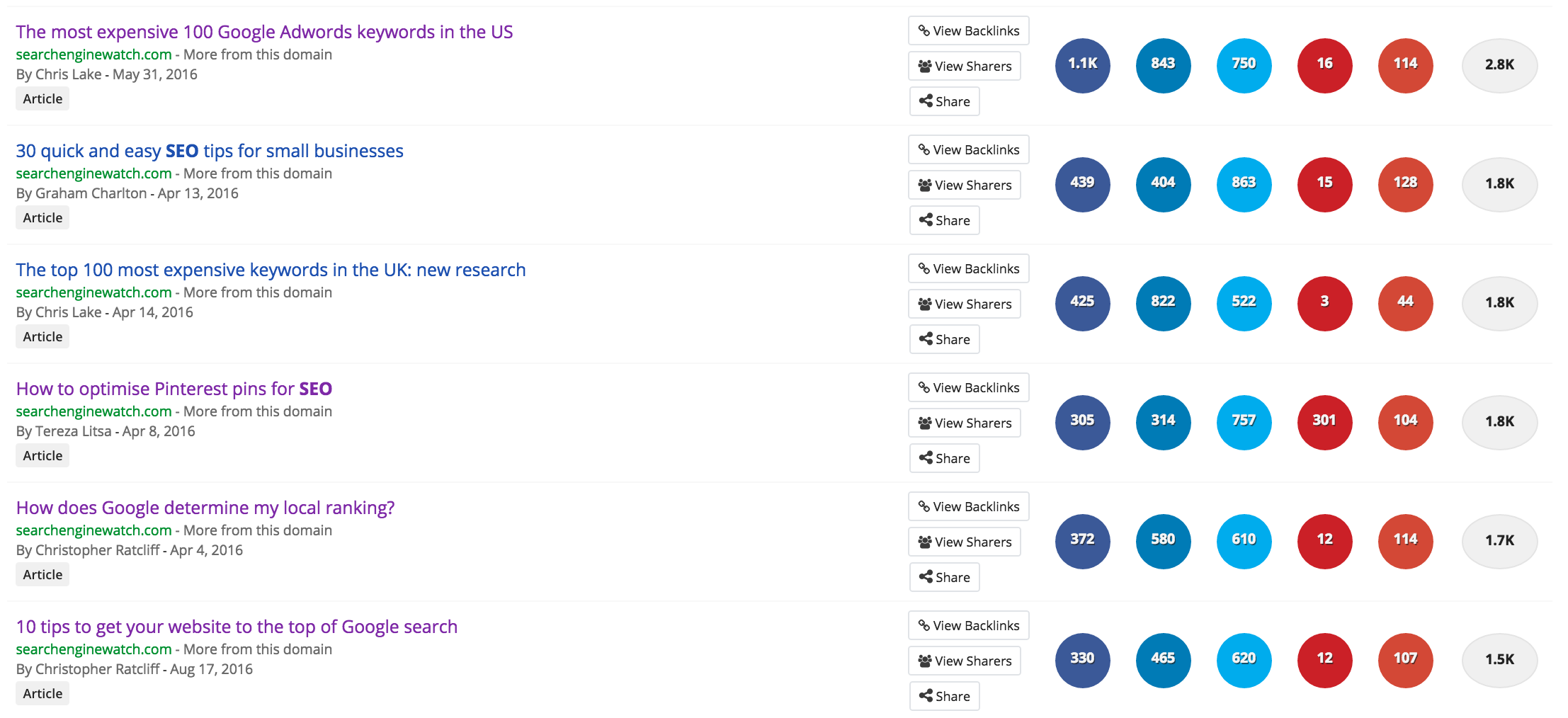
15 writing tips to rank higher on social and search results - SEO test


There's no need to rely on clickbait titles to increase your traffic, as this may not be appreciated by readers, which will eventually harm your long-term audience.


Facebook recently announced that it will penalise clickbait posts with a reduced news feed reach, due to a new algorithm update. This is an attempt to make publishers understand that there's no need to be vague, misleading, or controversial to lure new audience to your site, especially when the quality is not satisfactory to your promises.


There are still many ways to increase your traffic, but still respect your audience and a closer look at your recent topics and what led to their success could help you understand even more science of the headline.


2. Headings


Headings are both important for the structure of the page, but also for SEO. They can help Google understand the main topic of a post and thus, facilitate the ranking process.


Subheadings can improve the browsing experience for readers, helping them scan a longer post and guide them through the rest of the article.


You may use all the heading elements, from H1 to H6, depending on their usability, the type of the text, and its length, while you can also use more than one H1 heading, if you feel that it boosts the reading experience. Consistency is also important in all your posts and the way you use headings, in order to help search engines understand the way you use them.


3. Add value


It may sound obvious, but it's still important to conduct the necessary research for your topics to get a deeper understanding of it, but also to spot the right content gap you want to fill.


Every piece of content should add value, while it is also useful to focus on relevance and consistency, taking your target audience into consideration before deciding on your next topic.


4. Decide on the length


The length of the content varies depending on the industry, the reason it's created, the audience, or even the available time. Longer content may increase the chances of search engine optimisation, but this doesn't mean that you can't create content of less than 1000 words.


It's better to have several posts of more than 300 words to keep your content fresh, consistent and relevant, rather than creating less content to focus on its length.


The more content you have, the higher the chances to boost your ranking on SERPs.


5. Aim for more time spent on site


The time readers spend on your content indicates whether you can grab their attention and convince them to read more of your content.


One of the metrics that defines the success of content is the time readers spend on it. If the bounce rate is high and they only spend a few seconds on it, it means that you have fewer chances to convert them into loyal readers and eventually visitors.


However, if they spend fice or more minutes at the page, it is an indication that they are really interested in the topic and they want to thoroughly read about it.


You can increase the time readers spend on your content by improving the quality of it, focusing on its relevance to the audience and adding value to what's already available.


6. Focus on quality


Quality content is not just about increasing the time spent on the site, it is also about building your reputation as an authority to your field. This is a useful way to increase trust with your audience and use your content to build new relationships.


There's no need to sacrifice quality over quantity, as your content serves as the best way to boost your credibility and thus, your ranking in SERPs.


7. Pick a keyword


There's an old myth regarding keyword density and whether you should focus on it, or not. As SEO changes year by year, keywords should not be your priority when creating content, but they still serve as a starting point when picking a topic, but also as a useful SEO ally when using them properly.


Google may focus more on the context, rather than the specific keywords, which means that quality and relevance become important, but you can still use a focus keyword in your title and your text.


Just make sure you're not using it way too often, ruining the text's readability.


8. Optimise content for social sharing


By the time your content is ready, it's time to focus on its optimisation to ensure that you increase the chances of its distribution. It's not enough to write good content if it doesn't reach the target audience.


Optimisation may include the right headline, the proper image, the caption that will be used in social media, the use of the right social platforms, the hashtags that could be included, or the planning of the social posts.


It's all about understanding both your content and your audience to excel both in creation and distribution.


9. Add meta tags


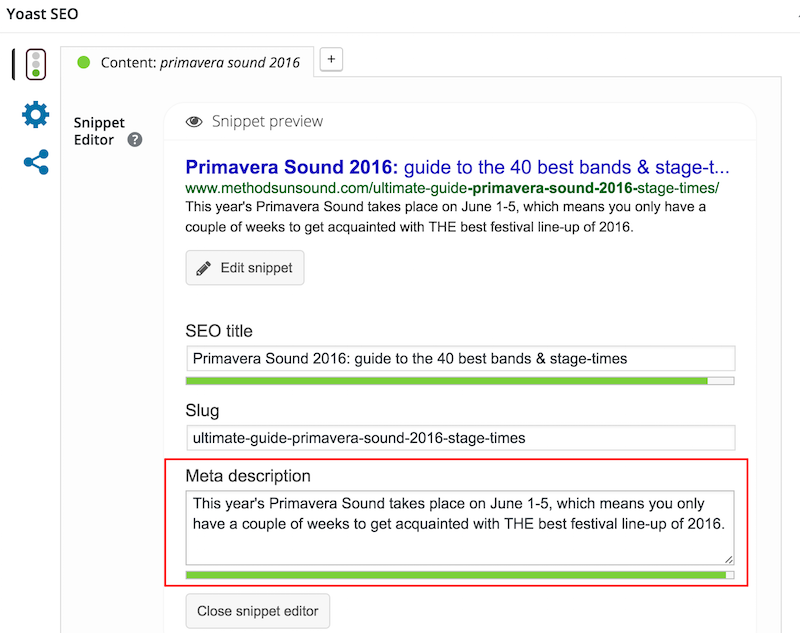
It may sound obvious, but it's also a task that we may overlook. Meta tags (title and meta description) affect the traffic your content will have from search results, which means that it's vital to optimise them as much as possible to be both clear and effective.


If you're using WordPress, it's easy to control your meta description with a plug-in, like Yoast, to create the best version that previews your content.


meta-description-example


It's the meta description that may influence a user whether to click on a page or not,  affecting the CTR and thus, the success of your content.


Here are some good and bad examples of meta descriptions if you need further help.


10. Think of the target audience


This is another obvious point, but it's still vital. Content cannot be successful if it doesn't meet the requirements of its target audience.


There should be a great understanding of what the audience expects from you, which questions they want answered, and how you can help them.


Start by analysing your existing content and how the audience responded. What worked and what could be improved? Is there a post that went surprisingly well?


How is the social interaction to your posts and which content got most links to it? 


11. Test readability


The readability of your content may affect the time readers spend on your page, which as we mentioned, it affects the value your content has.


There are many sites and tools (example) to test your readability score. You don't have to spend too much time on them to learn how to make the structure of your content simple and clear. You may still use it as an indicator of what you could improve. 


12. Test your SEO


You don't have to be an SEO expert to check your content's potential success in search rankings.


If you're using WordPress for example, tools like Yoast SEO, SEO by SQUIRRLY, or SEO Control Center can indicate what you need to improve, while they also help you expand your knowledge in search engine optimisation.


For example, you can learn whether your focus keyword is used properly on the key sections of your text (heading, url, meta description). You can also learn about the keyword density, and whether you need to use your focus keyword more, always in a natural way as part of the text.


15 writing tips to rank higher on social and search results - SEO test


Moreover, SEO by SQUIRRLY for example has the option of SEO Live Assistant, which is exactly what it promises to be, your live assistant in real time, while you're writing your post.


This may help you learn more about optimisation and create content both for humans and search engines.


13. Think of the visual element


It's rare to see a piece of content without any images, and there's no reason not to add them when they can provide further information and help with the content's readability.


Visual content helps with the formatting of the text, its optimisation (both for SEO and social media), but it's also a useful way to engage with the quick readers, the ones that prefer to skim the content rather than just read it.


Our love for visual content


That's why infographics became popular over the past years, as they are informative, but still appealing.


Thus, your visual content can stand on its own, or serve as an enhancement to your written text. In both cases, make sure there is a reason you add it. Visual content is not just about aesthetics, it should have a value and a justified reason of existence.


Need help with SEO tweaking for your images? Here's a useful guide to image SEO.


14. Add links


Don't be afraid to add links, whether they are internal or external. There's no need to link to every single post you come across, but it's still useful to showcase your references. It's not just about crediting the source, but it's also about helping Google rank your blog.


Outbound linking should indicate that you help the reader expand the knowledge on the topic with more useful posts. Google will also appreciate your dedication to the topic and the audience. Beware, users are becoming suspicious with links.


Internal linking is also important, as it helps you build authority and offer further value with previous content you may have written. This helps Google “crawl” your key topics and thus, rank you accordingly to these. And of course, you need to ensure that links open in new windows.


15. Proofread and edit


Not everyone is good at catching all the mistakes in a piece of content. If you feel that editing is not your strongest part, find the right tool, or ask for a professional's help.


Quality is crucial and it also affects the authority of your content, so you certainly cannot overlook it.

Most SEOs Are No Better than a Coin-Flip at Predicting Which Page Will Rank Better. Can You?

Posted by willcritchlow

We want to be able to answer questions about why one page outranks another.

“What would we have to do to outrank that site?”
“Why is our competitor outranking us on this search?”

These kind of questions - from bosses, from clients, and from prospective clients - are a standard part of day-to-day life for many SEOs. I know I've been asked both in the last week.

It's relatively easy to figure out ways that a page can be made more relevant and compelling for a given search, and it's straightforward to think of ways the page or site could be more authoritative (even if it's less straight-forward to get it done). But will those changes or that extra link cause an actual reordering of a specific ranking? That's a very hard question to answer with a high degree of certainty.

When we asked a few hundred people to pick which of two pages would rank better for a range of keywords, the average accuracy on UK SERPs was 46%. That's worse than you'd get if you just flipped a coin! This chart shows the performance by keyword. It's pretty abysmal:


It's getting harder to unpick all the ranking factors

I've participated in each iteration of Moz's ranking factors survey since its inception in 2009. At one of our recent conferences (the last time I was in San Diego for SearchLove) I talked about how I used to enjoy it and feel like I could add real value by taking the survey, but how that's changed over the years as the complexity has increased.

While I remain confident when building strategies to increase overall organic visibility, traffic, and revenue, I'm less sure than ever which individual ranking factors will outweigh which others in a specific case.

The strategic approach looks at whole sites and groups of keywords

My approach is generally to zoom out and build business cases on assumptions about portfolios of rankings, but it's been on my mind recently as I think about the ways machine learning should make Google rankings ever more of a black box, and cause the ranking factors to vary more and more between niches.

In general, "why does this page rank?" is the same as "which of these two pages will rank better?"

I've been teaching myself about deep neural networks using TensorFlow and Keras - an area I'm pretty sure I'd have ended up studying and working in if I'd gone to college 5 years later. As I did so, I started thinking about how you would model a SERP (which is a set of high-dimensional non-linear relationships). I realized that the litmus test of understanding ranking factors - and thus being able to answer “why does that page outrank us?” - boils down to being able to answer a simpler question:

Given two pages, can you figure out which one will outrank the other for a given query?

If you can answer that in the general case, then you know why one page outranks another, and vice-versa.

It turns out that people are terrible at answering this question.

I thought that answering this with greater accuracy than a coin flip was going to be a pretty low bar. As you saw from the sneak peak of my results above, that turned out not to be the case. Reckon you can do better? Skip ahead to take the test and find out.

(In fact, if you could find a way to test this effectively, I wonder if it would make a good qualifying question for the next moz ranking factors survey. Should you only listen only to the opinion of those experts who are capable of answering with reasonable accuracy? Note that my test that follows isn't at all rigorous because you can cheat by Googling the keywords - it's just for entertainment purposes).

Take the test and see how well you can answer

With my curiosity piqued, I put together a simple test, thinking it would be interesting to see how good expert SEOs actually are at this, as well as to see how well laypeople do.

I've included a bit more about the methodology and some early results below, but if you'd like to skip ahead and test yourself you can go ahead here.

Note that to simplify the adversarial side, I'm going to let you rely on all of Google's spam filtering - you can trust that every URL ranks in the top 10 for its example keyword - so you're choosing an ordering of two pages that do rank for the query rather than two pages from potentially any domain on the Internet.

I haven't designed this to be uncheatable - you can obviously cheat by Googling the keywords - but as my old teachers used to say: "If you do, you'll only be cheating yourself."

Unfortunately, Google Forms seems to have removed the option to be emailed your own answers outside of an apps domain, so if you want to know how you did, note down your answers as you go along and compare them to the correct answers (which are linked from the final page of the test).

You can try your hand with just one keyword or keep going, trying anywhere up to 10 keywords (each with a pair of pages to put in order). Note that you don't need to do all of them; you can submit after any number.

You can take the survey either for the US (google.com) or UK (google.co.uk). All results are considering only the "blue links" results - i.e. links to web pages - rather than universal search results / one-boxes etc.

Take the test!

What do the early responses show?

Before publishing this post, we sent it out to the @distilled and @moz networks. At the time of writing, almost 300 people have taken the test, and there are already some interesting results:

It seems as though the US questions are slightly easier

The UK test appears to be a little harder (judging both by the accuracy of laypeople, and with a subjective eye). And while accuracy generally increases with experience in both the UK and the US, the vast majority of UK respondents performed worse than a coin flip:


Some easy questions might skew the data in the US

Digging into the data, there are a few of the US questions that are absolute no-brainers (e.g. there's a question about the keyword [mortgage calculator] in the US that 84% of respondents get right regardless of their experience). In comparison, the easiest one in the UK was also a mortgage-related query ([mortgage comparisons]) but only 2/3 of people got that right (67%).

Compare the UK results by keyword...


...To the same chart for the US keywords:


So, even though the overall accuracy was a little above 50% in the US (around 56% or roughly 5/9), I'm not actually convinced that US SERPs are generally easier to understand. I think there are a lot of US SERPs where human accuracy is in the 40% range.

The Dunning-Kruger effect is on display

The Dunning-Kruger effect is a well-studied psychological phenomenon whereby people “fail to adequately assess their level of competence,” typically feeling unsure in areas where they are actually strong (impostor syndrome) and overconfident in areas where they are weak. Alongside the raw predictions, I asked respondents to give their confidence in their rankings for each URL pair on a scale from 1 (“Essentially a guess, but I've picked the one I think”) to 5 (“I'm sure my chosen page should rank better”).

The effect was most pronounced on the UK SERPs - where respondents answering that they were sure or fairly sure (4–5) were almost as likely to be wrong as those guessing (1) - and almost four percentage points worse than those who said they were unsure (2–3):


Is Google getting some of these wrong?

The question I asked SEOs was “which page do you think ranks better?”, not “which page is a better result?”, so in general, most of the results say very little about whether Google is picking the right result in terms of user satisfaction. I did, however, ask people to share the survey with their non-SEO friends and ask them to answer the latter question.

If I had a large enough sample-size, you might expect to see some correlation here - but remember that these were a diverse array of queries and the average respondent might well not be in the target market, so it's perfectly possible that Google knows what a good result looks like better than they do.

Having said that, in my own opinion, there are one or two of these results that are clearly wrong in UX terms, and it might be interesting to analyze why the “wrong” page is ranking better. Maybe that'll be a topic for a follow-up post. If you want to dig into it, there's enough data in both the post above and the answers given at the end of the survey to find the ones I mean (I don't want to spoil it for those who haven't tried it out yet). Let me know if you dive into the ranking factors and come up with any theories.

There is hope for our ability to fight machine learning with machine learning

One of the disappointments of putting together this test was that by the time I'd made the Google Form I knew too many of the answer to be able to test myself fairly. But I was comforted by the fact that I could do the next best thing - I could test my neural network (well, my model, refactored by our R&D team and trained on data they gathered, which we flippantly called Deeprank).

I think this is fair; the instructions did say “use whatever tools you like to assess the sites, but please don't skew the results by performing the queries on Google yourself.” The neural network wasn't trained on these results, so I think that's within the rules. I ran it on the UK questions because it was trained on google.co.uk SERPs, and it did better than a coin flip:


So maybe there is hope that smarter tools could help us continue to answer questions like “why is our competitor outranking us on this search?”, even as Google's black box gets ever more complex and impenetrable.

If you want to hear more about these results as I gather more data and get updates on Deeprank when it's ready for prime-time, be sure to add your email address when you:

Take the test (or just drop me your email here)


Sign up for The Moz Top 10, a semimonthly mailer updating you on the top ten hottest pieces of SEO news, tips, and rad links uncovered by the Moz team. Think of it as your exclusive digest of stuff you don't have time to hunt down but want to read!